In our earlier article Filling ITR 1-Form we filled Part A:Personal Details, Part B: Gross Total Income, Part C : Deductions and Taxable Total Income and Part D : Tax Computation and Tax Status for Mr. T. Mehta. In this part we shall fill the remaining part of ITR1 Form for the Assessment Year 2012-13(financial year 2011-12). Income Tax Dept Instructions for filling ITR-1(pdf) are useful.
Table of Contents
Recap
Details of income, investments and tax for Mr. T. Mehta are as follows:
- Income from salary : Document proof is Form 16. TDS for salary is updated in the Form 26AS.
- Income from other sources: Interest on saving bank account (Rs 5000) and Interest from Fixed Deposit(Rs 20,000). Documents for:
- Interest on saving bank account document is bank account statement. No TDS is deducted for interest on saving bank account.
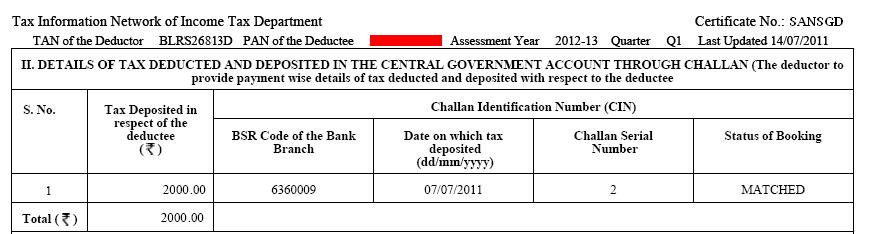
- Interest on Fixed Deposit: Document is Form 16A which shows TDS cut by bank at the rate of 10% if interest on the Fixed Deposit in the financial year is more than Rs 10,000 . As Mr. Mehta has earned interest of Rs 20,000 bank would deduct 10% of 20,000 i.e 2000. This is updated in the Form 26AS.
- He earned dividend from stocks and equity mutual funds for amount Rs 2,200. Interest from PPF was Rs 1,672. This income is tax free or exempted income
- Chapter VI-A Deductions: He has made investments which allow him to save income tax. The proof of these investments were submitted to his employer so these are reflected in his Form16.
- Section 80C: He invested Rs 30,000 in Public Provident Fund (PPF), paid Rs 7,000 as premium for LIC policy. These investments allow him to save tax under section 80C.
- Section 80D : He paid Rs 10,000 for premium of health insurance policy for his family.
- Tax Deducted at Source(TDS) is Rs 46,269.
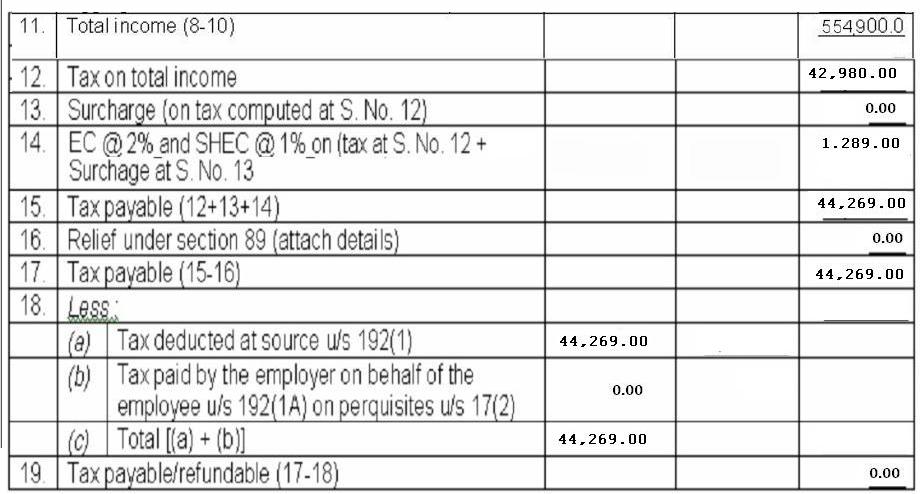
- Salary income, Rs 44,269 shown in Form 16, including Education Cess and Surcharge.
- Interest on Fixed Deposit Rs 2,000 shown in Form 16A given by bank.(Note: bank cuts TDS only when interest on FD is more than 10,000 in an year)
Bank Details
Tax-payer needs to provide the Bank details irrespective of refund due or not. Bank details are: Account Number, Kind of account(Current/Saving), MICR Code. If refund is due (s)he can choose how to receive refund through cheque or ECS.
MICR is an acronym for Magnetic Ink Character Recognition. The MICR Code is a numeric code that uniquely identifies a bank-branch. This is a 9 digit code to identify the location of the bank branch; the first 3 characters represent the city, the next 3 the bank and the last 3 the branch. The list of bank branches and the MICR codes allotted to them is available on the website of Reserve Bank of India:MICR Codes (xls format) or Ratekhoj:Find MICR Code . The MICR Code allotted to a bank branch is printed on the MICR band of cheque leaves issued by bank branches as shown in image below . Bemoneyaware: Details of Cheque discusses cheque in detail. Ref for image:MICR – A Bank Term
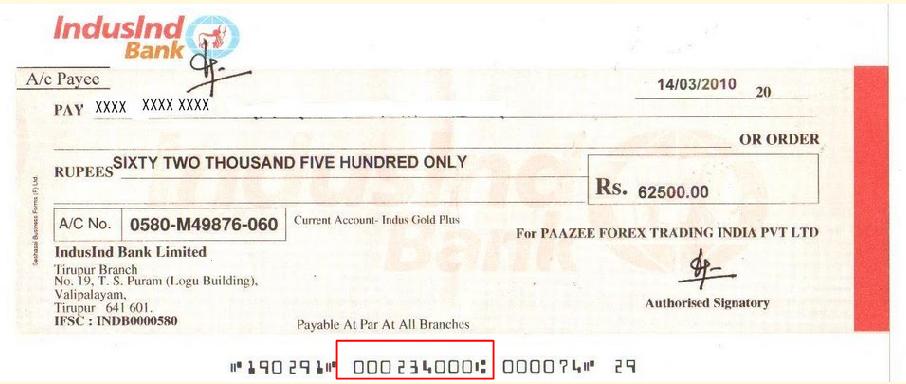
Bank Details for Mr. Mehta is shown in picture below. He has opted for refund(if any income tax dept. finds) to be deposited to the bank account. If you opt for cheque and you have a refund the cheque of SBI Bank account will be posted to your postal address mentioned in the Personal Details part.

Exempt Income
Some income which is exempted from tax like interest on PPF, Dividend from mutual funds, Dividend from stocks. This also has to be reported. As per worksheet of Sahaj, calculation of exemption income for Mr. Mehta is as follows
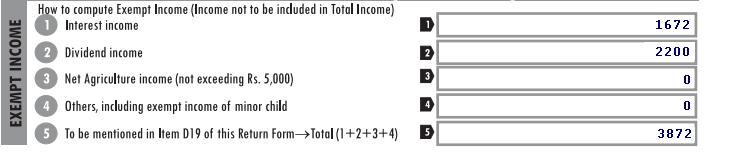
This will be reflected in ITR1 Form as

Sch IT – DETAILS OF ADVANCE TAX AND SELF ASSESSMENT TAX PAYMENTS
As discussed in Filling ITR 1-Form Mr. Mehta had to pay Self Assessment Tax of Rs 3,150. He paid it using Challan No. ITNS 280. The receipt for filling self assessment tax is as follows
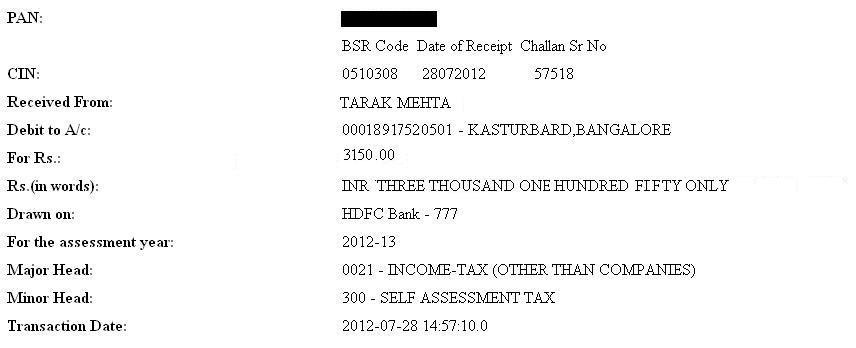
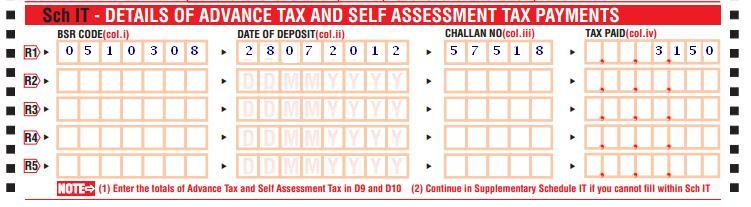
Sch TDS1: Details of Tax Deducted at Source From Salary
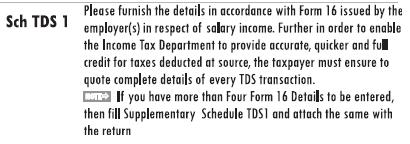
As per Form 16 issued by Employer(s) you have to fill in the Tax Deducted at Source. Instructions for filling Sch TDS1 are :
Form 16 shows the TDS deducted by employer. Part of Form 16 that shows the tax calculation and tax deducted For Mr. Mehta is shown in figure below:
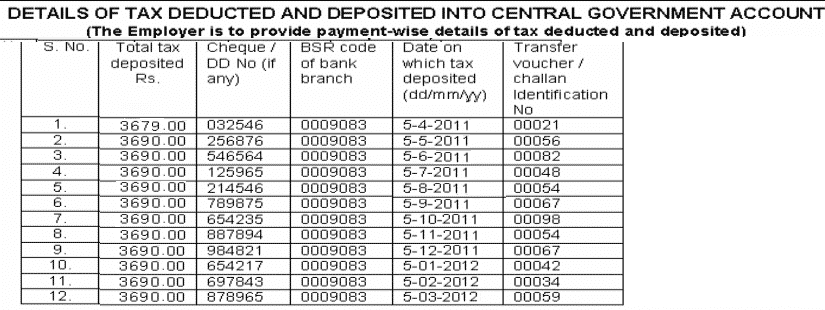
Details of TDS of Rs 44,269 are also in Form 16 as shown in picture below
Sch TDS1: Details of Tax Deducted at Source From Salary based on Form 16 for Mr. Mehta will be as shown in picture below

Sch TDS2-DETAILS OF TAX DEDUCTED AT SOURCE FROM INCOME OTHER THAN SALARY
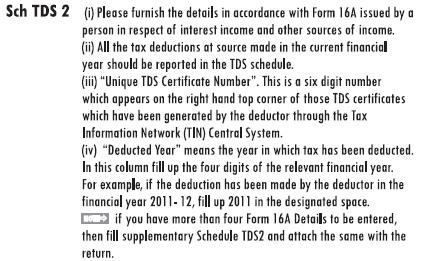
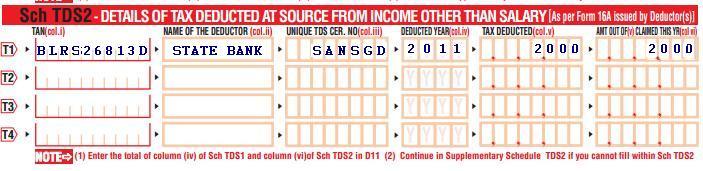
This Schedule or Part of ITR1 has to be filled As per Form 16A issued by Deductor(s). Instructions for filing the Sch TDS2 is as follows:
Quoting from SimpleTaxIndia:Unique TDS Certificate Number As per the new procedure of Issuance of TDS Certificates in Form No. 16A for Tax deducted on or after 01.04.2012,
- For Companies,Banks, Co-operative society engaged in banking business, has been directed mandatory to download Form 16A from TIN Web Site and issue such downloaded certificates to deductees. For other deductors, it was optional to download Form 16A from TIN Web site.
- Such downloaded TDS certificate will have a unique TDS Certificate Number.This procedure is applicable for all deductions made on or after 01-04-2011 by these three type of deductors.
As Unique TDS certificate Number is available only on Form 16A downloaded from TIN-NSDL site .Further in Financial Year 2011-12 it was not mandatory for all type of deductors to issue only form 16A downloaded from TIn-NSDL website ,so it is not mandatory to Fill Such number in Income Tax return Form . You can fill Unique Tds certificate number where ever available.
Unique Tds certificate number and Excel Utility problem: This has also been given in E filing utilities issued by the Income Tax department in excel . Help/Comment to this field is “Fill 8 character Unique TDS certificate number wher available” has been shown. But actually Unique TDS certificate number has 6 alphabets. If you fill in 6 alphabets you get an error.
This Field is not mandatory as of now .So there is no direct effect on your income tax return or on your refund ,but it is advisable to fill this number where available with us
For Mr. Mehta the part of Form16A which shows TDS details are shown in image below
ITR1 Sch TDS2 will be filled as shown in image below( we have shown the Unique Tds certificate number)
After filing of Form
Related Articles:
- Filling ITR 1-Form
- Filling Individual ITR Form: Fields A1 to A22
- After filing Income Tax Return
- Understanding Form 16: Tax on income
- Understanding Perquisites, Understanding Form 12BA
- Income Tax Overview

14 responses to “Filling ITR-1 : Bank Details, Exempt Income, TDS Details”
Is there anyone who want an IFSC Code of bank his searching for then he must visit this site
https://detailsofbanks.blogspot.com/
Sir I pay Rs 100000 donation to a religious institution.it is registered under 80 G (5) (vi).Iam working as a teacherin govt school.How much amount can I get refund.
You get the refund if you have paid more tax than you were supposed to pay.
The amount of donation which can be claimed as a deduction under section 80G is determined as per certain rules. You can claim either 100% or 50% of the amount donated as a deduction subject to ‘With’ or ‘Without’ the upper limit.
Donation to the institution which satisfies conditions mentioned in Section 80G(5) is eligible for 50% deduction subject to 10% of adjusted gross total income
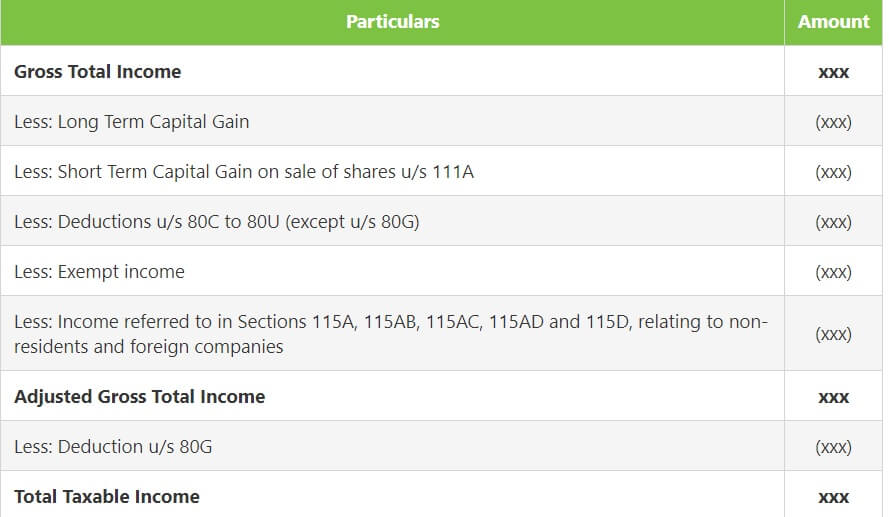

Gross Adjusted income for this purpose is calculated as Gross Total Income minus (i) all exempted incomes, (ii) long-term capital gains and, (iii) all deductions under section 80C to 80U except for 80G as shown in the image below
That’s really astounding! Does that still work?
I have paid the remaining tax after my filed return[2016-17].How can I link the tax paid along with my current return. Could you please guide the steps.
Can I do again quick efile or anyother way to add my paid tax.
I have changed the employer in between the FY and the clubbed form 16 shows the Rs 4050 income tax excess in that is showm in both the form 16, which I payable and I have to pay online while filling the ITR 1, pl guide me.
I am a research scholar in XLRI and I am getting a scholarship of Rs.25000/- pm (Rs.3 lacs p.a) in addition I have interest income of Approx Rs.9000/- p.a from FDs. Please let me know the IT form which I should fill in and file on line as my annual income exceeds Rs.2.50 lacs.
Test
please confirn in TDS1 , income under salary is 6. income chargable under salary head or 11. total income (8+10), i think it should be point 6.
[…] Filling ITR-1 : Bank Details, Exempt Income, TDS Details […]
[…] Filling ITR-1 : Bank Details, Exempt Income, TDS Details […]
[…] Filling ITR-1 : Bank Details, Exempt Income, TDS Details […]
[…] is shown in DETAILS OF TAX DEDUCTED AT SOURCE FROM INCOME OTHER THAN SALARY. Sample images from Filling ITR-1 : Bank Details, Exempt Income, TDS Details are shown below for Mr. Mehta who had income Interest on saving bank account (Rs 5000) and […]