The Pradhan Mantri Garib Kalyan Yojana (PMGKY) came into effect from 17 December 2016. It will remain open until March 31, 2017. This article talks about how to Submit Online Form1 of Pradhan Mantri Garib Kalyan Yojana PMGKY 2016.
Table of Contents
How to use Pradhan Mantri Garib Kalyan Deposit Scheme or PMGKDS 2016
Offering one last window to black money holders, the government has come out with a scheme giving black money holders time until March-end to come clean by paying 50 per cent tax on bank deposits of junk currencies made post demonetisation. The Pradhan Mantri Garib Kalyan Yojana (PMGKY), 2016, is a declaration under section 199C of the Finance Act, 2016, in respect of the Taxation and Investment Regime for PMGKY.
- One has to pay 50 per cent tax ,a must for availing immunity from prosecution for hiding income using Challan 287
- Using Form 2 Pay 25% of the amount declared is to be deposited in a non-interest bearing deposit called Pradhan Mantri Garib Kalyan Deposit Scheme, 2016 for four years in Authorised Banks. Such deposits will not be transferable except to nominee or the legal heir of the declarant in the event of death
- A simple Form 1 has to be filled for declaring unaccounted cash under the new tax evasion amnesty scheme which does not require one to reveal the source of such income online or offline. Declarants will need to fill in
- personal details like office and home address, telephone numbers, email and PAN ,
- details of bank and/or post office accounts where the cash has been deposited post the junking of old Rs 500 and Rs 1,000 notes.
- Furnish the payment details of 50 per cent tax
- Furnish payment details of 25 percent of amount deposited in Pradhan Mantri Garib Kalyan Deposit Scheme, 2016
- The Form 1 can be filled online or in print form
- The Tax authorities will issue a certificate to the declarant within 30 days from the end of the month in which a valid declaration has been furnished.
- Example of Amount of Tax and Penalty that one has to pay under Pradhan Mantri Garib Kalyan Yojana PMGKY 2016
-
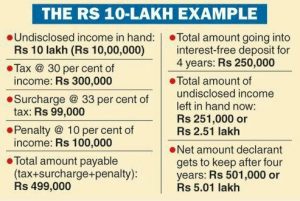
Pradhan Mantri Garib Kalyan Deposit Scheme PMGKDS 2016 example
Prepare and Submit Online Form1 of Pradhan Mantri Garib Kalyan Yojana PMGKY 2016
Pre-Requisites for Filling Form 1 of PMGKY Online are as follows
- To upload Form1 (PMGKY), user should have a valid PAN and should be registered in e-Filing portal.
- Form1 (PMGKY) can be filed online using either Digital Signature (DSC) or Electronic EVC. If the user opts to use the DSC facility, a valid DSC should be registered in e-Filing portal.
- Form 1 (PMGKY) can be submitted using EVC options in available in e-Filing portal.
- Scanned copies of Proof of payment of Total Taxes and Proof of deposit in Pradhan Mantri Garib Kalyan Deposit Scheme, 2016 should be kept ready for upload.
How To Submit Online Form 1 of Pradhan Mantri Garib Kalyan Yojana PMGKY 2016
Login to you account on income tax website incometaxindiaefiling.gov.in. In e-Filing Homepage, Click on “Login Here”. Enter User ID (PAN), Password, DOB/DOI and Captcha. Click Login
Go to PGMGKY ->Prepare and Submit Online Form 1, PMGKY as shown in image below

User will be redirected to the following page where the user can select the option to whom to submit the “Form 1”.
- If the user selects “Jurisdictional PCIT/CIT”, then the user can go ahead to fill and submit “Form 1” using either Digitial Signature or EVC.
- If the user selects “CIT (CPC), Bengaluru”, then the user can fill and submit “Form 1(PMGKY)” only using DSC

After selecting the option, the user can click on “Continue” to open “Form 1(PMGKY)”
- The PCIT/CIT details shall be auto-populated from the database. If not auto-populated, the user can enter the details.

- Name of the assesse shall be auto-populated from the login Profile.
- Address should be entered by the user. Either Office or Residence address is mandatory
- PAN shall be auto-populated from the login profile. Aadhaar Number can be entered by the user. If the Aadhaar is already linked in the profile, the same shall be pre-filled. Status of the declarant should be selected by the user.
- The user should specify the “Filing Status” as Original or Revised.
- If the declaration is “Revised”, then the user should enter the following details
- Receipt No. of filing original Form-1
- Date of filing original Form-1
- Reasons for revised declaration

Enter details of Amount held in cash and Details of amount deposited in a bank account/post office account etc
- 7b(i) The “Amount held in cash” should be entered by the user. Only numbers are allowed, no decimals.
- 7(b)(ii) The “Details of amount deposited in a bank account/post office account etc.” should be entered by the user as follows
- Amount should be entered by the user. Only numbers are allowed, no decimals
- Account type can be selected from the drop down as Savings, Current, Cash Credit, Fixed Deposit, Recurring Deposit.
- Account number should be entered by the user as per the valid number allocated by the Bank/Post-office etc.
- Institution Type can be selected from the drop down as Bank, Post Office, NBFC, Others.
- IFSC should be entered by the user, if Institution Type is selected as “Bank”. This should be a valid IFSC of the Bank Branch.
- Name of the Bank /post office etc. should be entered by the user. If a valid IFSC is entered, the Name of the Bank shall be auto-populated.
- Branch name/Sub-Post office Name should be entered by the user.
- Unique Code for Other than Banks should be entered by the user, if Institution Type is selected as other than “Bank”.
The “Total amount of undisclosed income declared” shall be auto-populated from the total of [Pt No. 7(b)(i) + Pt No. 7(b)(ii)]. The amount is displayed in Rupees and in Words.

Tax, Surcharge, Penalty and Total are auto-calculated based on the data entered by the user.

Details of amount paid as tax using Challan 287 on or before the date of declaration should be entered by the user as follows: BSR Code of Bank, Date of Deposit,Serial Number of Challan , Amount

Details of amount deposited in Pradhan Mantri Garib Kalyan Deposit Scheme, 2016 should be entered by the user as follows. Form II for depositing under Pradhan Mantri Garib Kalyan Deposit Scheme
- Amount deposited should be minimum 25% of the Total amount of undisclosed income declared at Pt No. 7(a).
- Date of deposit should be in DD/MM/YYYY format.
- Acknowledgement/deposit reference number should be a valid number allocated by the specified entity.
- Name and details of branch of the entity in which deposit is made should be provided as a valid IFSC & Name of the Bank.

Under Verification, the user should select an option from the drop down as Son/Daughter/Wife and enter the name accordingly. Capacity under which declaration is being made should be entered. Place should be entered by the user.

Under the “Attachments” sheet, One has to attach Proof of payment of Total Taxes and Proof of deposit in Pradhan Mantri Garib Kalyan Deposit Scheme, 2016

On successful validation, click on “Submit”. You can Submit Online Form 1 Using EVC Form 1 or Submit Online Form 1 Using Digital Signature (DSC) If the user has a registered DSC
Form 1 can be e-Verified using any of the following options as shown in image below

Form 1 can be Submittted Online Using Digital Signature or DSC
For Submitting using Digital Signature or DSC one needs to Attach the Signature file. Upload the signature file generated using DSC Management Utility for the uploaded XML file. For further details on generating Signature file click here. Navigate to Step by Step Guide for Uploading XML. On Successful submission a success message will be displayed on the screen

Forms for PMGKY
- Challan-No-ITNS-287 Form for filling in Bank.
- Form 2 to Pay 25% of the amount declared is to be deposited in a non-interest bearing deposit called Pradhan Mantri Garib Kalyan Deposit Scheme, 2016 for four years in Authorised Banks.
- Form 1 Declare undisclosed Income
Related Articles:
- How to use Pradhan Mantri Garib Kalyan Deposit Scheme PMGKDS 2016
- Tax on Undisclosed Income and Pradhan Mantri Garib Kalyan Yojana 2016
- How to declare Unaccounted Cash in Demonetized Notes Options and Tax
- Giving Cash and Deposit money into Bank Accounts and Tax on Gifts
- Tax and penalty on Cash Deposit due to Demonetization
- Transactions reported to Income Tax Department
- Black Money : What is Benami Property and Benami Act?
- How to Exchange Rs 500 and Rs 1000 Notes ?
- New Rs 500 and Rs 2000 notes : Features,Comparison


One response to “Submit Online Form 1 of Pradhan Mantri Garib Kalyan Yojana PMGKY 2016”
India against corruption is the website that shows various government schemes and also about various other attractions about the Governments.
We also tell about various scholarships and contests that matter much for all.
Thanks.