New Unified Portal of EPFO was launched on 28 Dec 2016. Our earlier password was not working. We were able to login to UAN new website, by changing our password as our mobile number had not changed. This article talks about how to Change Password of UAN if the mobile number is NOT changed in detail with images.
Overview of Steps to Change Password of UAN website if Mobile number is not changed
- Go to EPFO website at UAN: Home
- Click on Forgot Password.
- Enter your UAN number and Captcha. Click on Verify.
- The mobile number mapped to your UAN will be shown. If you want to change the mobile Number you can click on No.
- Click on Get Authorized Pin
- If OTP is successfully sent, you will see the message OTP is successfully sent. If the website is unable to send the OTP(due to heavy traffic) you will get the window with message Failed to send OTP. Please try again later. Then try the steps mentioned above again after some time.
- If OTP is sent successfully, then you will get the OTP on your mobile number registered with the UAN. The message would be Dear Mr. ABC XYZ. Your OTP corresponding to OTP id 6000 is 3937. Enter this pin to set a new password for your account. Please use the pin and not the OTP id.
- Enter the OTP Pin at Enter Authorization Pin.
- Enter the New Password. The Password should contain minimum 7 characters and Maximum 20 characters. Minimum 4 alphabets, minimum 2 digits, 1 special character. At least one character out of 4 alphabets should be Capital and one small letter.
- Confirm the New Password.
- Click Submit button.
- You will get a window saying password successfully changed.
- Login to UAN New Website with UAN number and new Password.
Steps to Change Password of UAN website if Mobile number is not changed in Detail
The UAN is a 12-digit number allotted to each Employee Provident Fund member by the Employee Provident Fund Organization(EPFO) which gives him control of his EPF account and minimizes the role of employer. UAN acts as an umbrella for the multiple Employee Provident Fund Numbers or Member Ids allotted to an individual by different employers. The idea is to link multiple Employee Provident Fund Number of a person to single Universal Account Number. Our article UAN or Universal Account Number and Registration of UAN discusses it in detail.
New Unified Portal of EPFO was launched on 28 Dec 2016. It has stopped on 17 Dec 2016. Our old password for UAN website was not working. We were able to login to UAN new website by changing our password as our mobile number had not changed by following the steps mentioned below.
Steps to Change Password in New UAN website in Detail with images is given below
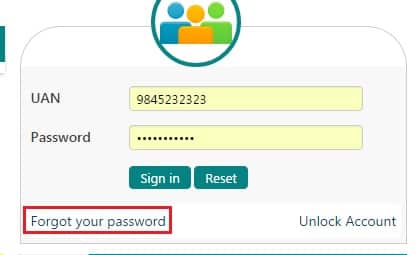
Go to EPFO website at UAN: Home. Click on Forgot Password.
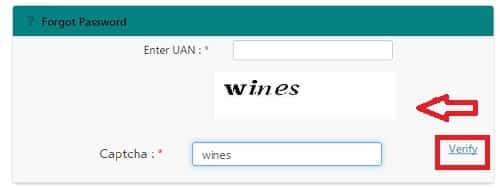
Enter your UAN number and Captcha. Click on Verify.
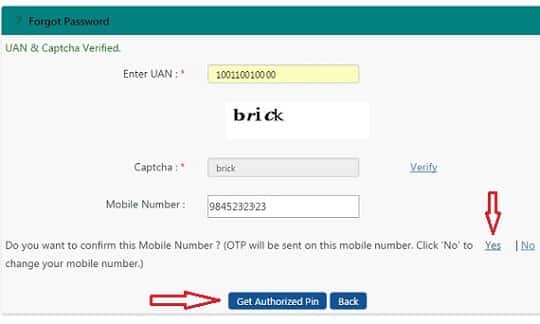
The mobile number mapped to your UAN will be shown. As you don’t want to change the mobile Number you can click on Yes. You will see 2 buttons Get Authorized Pin and Back. Click on Get Authorized Pin
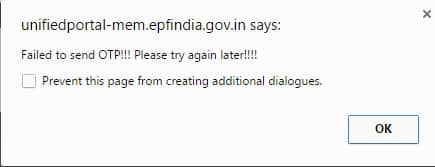
If OTP is successfully sent, you will see the message OTP is successfully sent. If the website is unable to send the OTP(due to heavy traffic) you will get the window as shown in the image below. Then try the steps mentioned above again after some time.
If OTP is successfully sent then you will get the OTP on your mobile number registered with the UAN. The message would be Dear Mr. ABC XYZ. Your OTP corresponding to OTP id 6000 is 3937. Enter this pin to set a new password for your account. Please use the pin and not the OTP id.
Enter the OTP Pin at Enter Authorization Pin.
Enter the New Password. The Password should contain minimum 7 characters and Maximum 20 characters. Minimum 4 alphabets, minimum 2 digits, 1 special character. At least one character out of 4 alphabets should be Capital and one small letter.
Confirm the New Password.
Click Submit button.
You will see the window which confirms that Password has changed.
Login to UAN New Website at UAN: Home with UAN number and new Password.
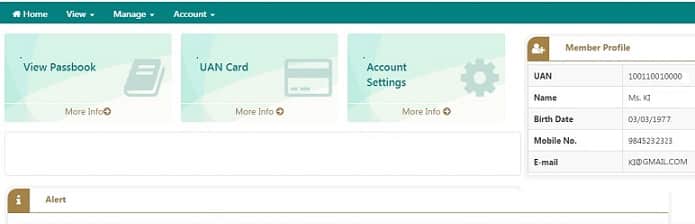
The new Website looks as shown in the image below
Related Articles:
- UAN or Universal Account Number and Registration of UAN
- UAN Problems, Password,Mobile Number,Incorrect Details and Help Desk
- FAQ on UAN number and Change of Job
- Transfer EPF account online : OTCP
- Understanding Employee Pension Scheme or EPS

56 responses to “How to Change Password of UAN if Mobile number is not Changed”
Hi,
I am trying to recover my password. However, I have tried so many times and faced the same error “Failed to send OTP. Please try again later.
Can anyone help me with that?
hi sir I HAVE LOST MY PHONE, new sim not purchasing due to id problem and my Aadhar name matching I DIDN’T UPDATE KYC IN PF and my mobile number is ;7338725732 pls help me I have money very urgent
HOW I LOG IN MY ACCOUNT
I updated my phone number and changed the password, but when i try to login to check the passbook with the same credentials, i get an error saying invalid username or password.
any advise?
You have to wait for 6 hrs after changing your password.
Try now and see if it works.
HELLO SIR,
I HAVE LOST MY PHONE,
I DIDN’T UPDATE KYC IN PF
HOW I LOG IN MY ACCOUNT
Did you get a new SIM or is your phone number changed?
i am trying to change the password i have given password as xyz@123
and confirm password as xyz@123 it is not validating at all
“The Password should contain minimum 7 characters and Maximum 20 characters. Minimum 4 alphabets, minimum 2 digits, 1 special character. At least one character out of 4 alphabets should be Capital and one small letter. ” You have given only 3 alphabets when you need to give minimum 4 alphabets out of which one should be capital. This is the reason for not validating. You can try Wxyz@123 as password.
Hi,
I have UAN number, I don’t have UAN registered mobile number now. My Aadhar is linked with this UAN number. I am unable to recover the password. Kindly give a solution.
Thank you
I have set the new password like number, spacial character also include alphabet…. But it’s show invalid password … I try so many times…. Then what can I do…
Rule for EPF password is
The Password should contain a minimum of 7 characters and maximum 20 characters. Minimum 4 alphabets, minimum 2 digits, 1 special character. At least one character out of 4 alphabets should be Capital and one small letter.
For example IND!A1947
Hi
I’m changing the password first time,but when i enter the my UAN number and captcha,then showing that your UAN is not active.Can you give answer? What can i do for set new password.
Hi sir
Password missing new password not generate pls help me
thx alot ..changing password i was going mad
forgot my passoward
Amarjeet 1234@#
Try without space character
The Password should contain minimum 7 characters and Maximum 20 characters. Minimum 4 alphabets, minimum 2 digits, 1 special character. At least one character out of 4 alphabets should be Capital and one small letter.
What is the special characters to enter new password reset
The Password should contain minimum 7 characters and Maximum 20 characters. Minimum 4 alphabets, minimum 2 digits, 1 special character. At least one character out of 4 alphabets should be Capital and one small letter.
Special character example are !@#$%&€£¥₩
For digit Do not use 1234 which is very common. Don’t use your date of birth/important dates which one can get from social media.
Ex can be : Venk!2019
special charecter meanscapital for ex:my name is sundar i put password for Sundar@1234
Hello Sir
I am trying to transfer my pf but when I am trying to generate OTP , it throws error “failed to send OTP”.Please advise how to resolve this issue.
Even I am seeing the same error – unable to login to EPFO members site.
hello when am trying to change password throwing error as Failed to send OTP. Please try again later. from many days . Please advice how to change
I also having the same issues. If ur problem will be solve then Pls send me back that how u resolve it. On my email amarjeet.Kolay@gmail.com
Hi Pallavi,
Pl do update your Cell phone number with Aadhar card and once it is updated with Aadhar card then try again, will receive you an OTP message.
Plzzzz Change my mobile number: old number- 9750985323, New number- 9677944177, my uan number: 100069378543
Change my mobile number: old number- 9750985323, New number- 9677944177, my uan number: 100069378543
how to change pf pass word
Sir Mera name raji Krishan Mai apna UAN password reset Kara hu to problem ho Raha contact EPFO office how I solve problem
What problem are you facing?
Does Data does not match?
rushi
sir i want to change UAN passward kindly gude me sirrr
[…] article How to Change Password of UAN if Mobile number is not Changed discusses in detail with […]
vijaysingh
dear sir,im try to change the password for the UAN number,i am entering the 4alphabtes ,one special character and 4digits its still displaying invalid password,pleas guide me the same.
Sir,
My old Mobile No.9061902101 is a cancelled and taken a new sim number 9946289971 in my name because the first one was not in my name at the time of registration of Aadhar. The first referred mob No. had already given when PF registration before 2-3 years. Then I tried several ways and though I changed my mobile number to new one, it was shown that you have allotted UAN number. Now I got two UAN numbers even the establishment and PF number is same.
Kindly advise me what to do sir.
Hi Iam trying to view my passbook but it is showing incorrect password for the said UAN. Please help!
When did you change your UAN password?
Passbook will be available after 6 Hours of registration at Unified Member Portal.
Changes in the credentials at Unified Member Portal will be effective at this Portal after 6 Hours.
JAIPAL SINGH UAN 100976431744 MOBIIEN NO 9582459871 PLZ Add my mobile no
Sir what problem are you facing in trying to add your mobile number?
I am not able to set the password send me sample
I am not able to set password so please help me
sir plzzz change my new mobile no -7088364030-and my old mobile no-9716929275
Do you want to donate your KlDNEY? contact Dr.Michael Varghese. We are urgently in need of organ donors for money $450.000
Dr. Michael Varghese
Phone: 919500703584
WhatsApp: 919500703584
Email: drmichealvarghes@ gmail.com
respected sir… today i have changed my uan password and when go to check the password then i got a message of invalid password.
.
please advice what to do?
Which browser did you use?
Where are you changing the password?
I want uan password…..
MD.SHAMIM
EPF NO:- GN/GGN/1314692/00736
UAN NO :-100949920458
MOB NO :- 8130870702
E MAIL :- ASAMIMMOHD034@GMAIL.COM
requsted to my mobile no activate to uan no
You have to activate it yourself.
Are you facing any issue?
Our article UAN or Universal Account Number and Registration of UAN discusses it in detail.
Dear sir/man
I am not gating epf massage in my mob no 9238560850.please check it.
Have you activated UAN? Then you can check which mobile number is linked to your UAN.
EPF messages will be going there.
Hello Sir/Madam
HELPLESSSSSS !! 🙁 🙁
I am need of your help very badly for the below 2 issues.I tried contacting customer care but they never seem to respond.Luckily,this site came to my rescue.
>>> I wanted to transfer my PF from one employer to another,so I started off by logging into EPFO site and checking eligibility, but got the below error
“SINCE PREVIOUS ESTABLISHMENT ID IS NOT REGISTERED IN THE PORTAL,YOU WILl NOT BE ABLE TO TRANSFER CLAIM ONLINE”. What should i do about this sir/madam?
>Next i wanted to check if my PF ACCOUNT exists in UAN site,Unfortunately i do not know my password.I proceeded by clicking on FORGOT PASSWORD and CHANGING MOBILE NUMBER(as the number was incorrect).This attempt was unsuccessful as well,i got an error as MEMBER VERIFICATION FAILED. What should i do about this sir/madam?
It really sucks to know that government is not taking any steps on such important sites and there is no proper customer care.
Hope i find a solution for the issues atleast here.
Thanks in advance 🙂
Change mobile number my new mobile number 7838090101
Jogeswar doley
My mobile no change old no.7733093862 New no. 8875526564
Pleas change mobile no my new mobile no 8522918710