The UAN account is linked to a mobile number and Email id. You can check the mobile number/email id linked after logging in to UAN website and checking View->Profile. You can change the mobile number or email id linked to your UAN account by logging to UAN website with your UAn and password and clicking on Manage->Contact Details. This article explains how to find the details associated with your UAN account and how to change mobile number and email id linked to all the EPF accounts linked to UAN account.
Table of Contents
Check Mobile number or Email id on UAN website
Mobile number is important in UAN as details regarding EPF contribution by the employer are sent to the mobile number. If you forget your password, the OTP will be sent to the mobile number mentioned in your UAN website. So one should keep the Mobile number updated on UAN website.
- Login to UAN website with your UAN number and password
- Go to View in Menu and Click on Profile
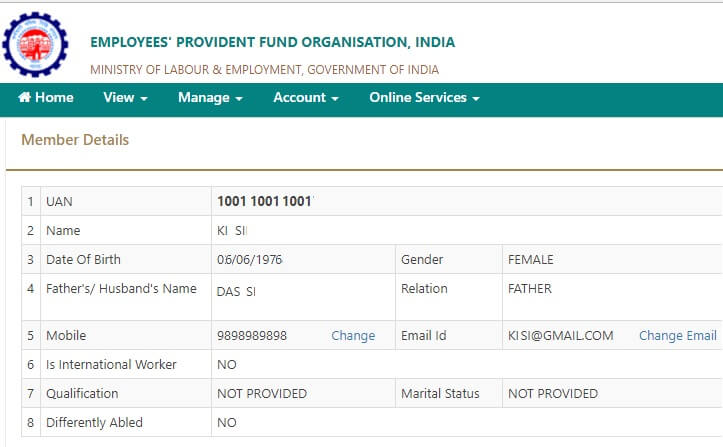
- You will see the details related to your UAN site as shown in the image below.
- You can click on Change to Change Mobile Number or Change Email to change Email id.
Change Mobile Number in UAN if forgotten Password and Mobile Number Changed talks about how to Change Mobile Number in UAN online if you have forgotten your password and your mobile number has changed.
New UAN Unified Portal for Employees explores the UAN website and goes through various Menus and Options.
How to change Mobile Number on the UAN website
Mobile number on the UAN website can be changed by following the steps given below
-
- Login to UAN website with your UAN number and password
- Go to Manage in Menu and Click on Contact Details
- Choose the checkbox next to Change Mobile Number

- You can see two text boxes
- Enter the new mobile number in the box of New Mobile No
- Re-enter the new Mobile number. It will be shown as dots.(as shown in the image below)
- If the number entered is not same as in New Mobile No, you see an error message saying Re-enter valid mobile no.
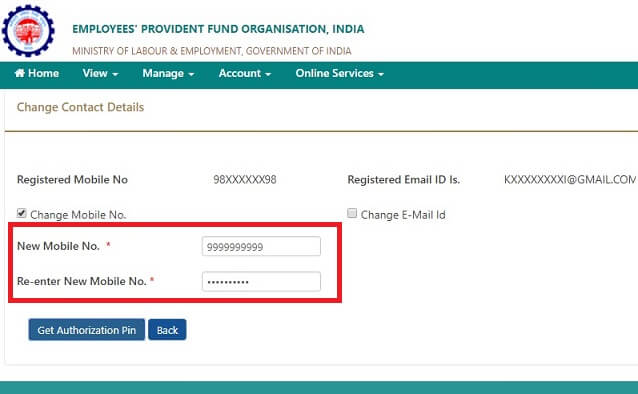
- Click on Get Authorization Pin
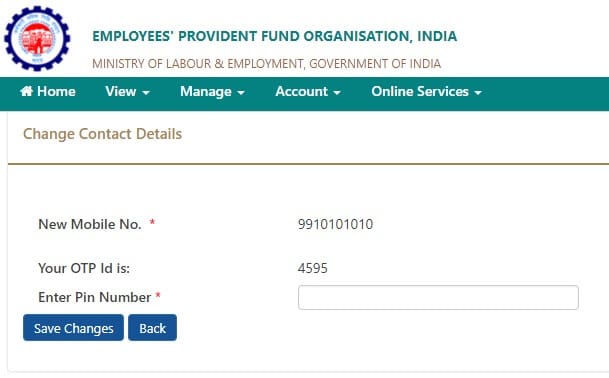
- Enter the Authorization Pin sent to your old Mobile Number which was registered with UAN
- Click on Save Changes, Your new mobile number will now be the Mobile number registered with UAN website
How to change Email id on the UAN website
Email Address of the user can be changed in the EPF Account by following the below process in the UAN Portal
- Login to UAN website with your UAN number and password
- Go to Manage in Menu and Click on Contact Details
- Choose the checkbox next to Change Email Address
- You can see two text boxes
- Enter the New Email Address
- Re-enter the New Email Address same as entered above. The email id will be shown as dots
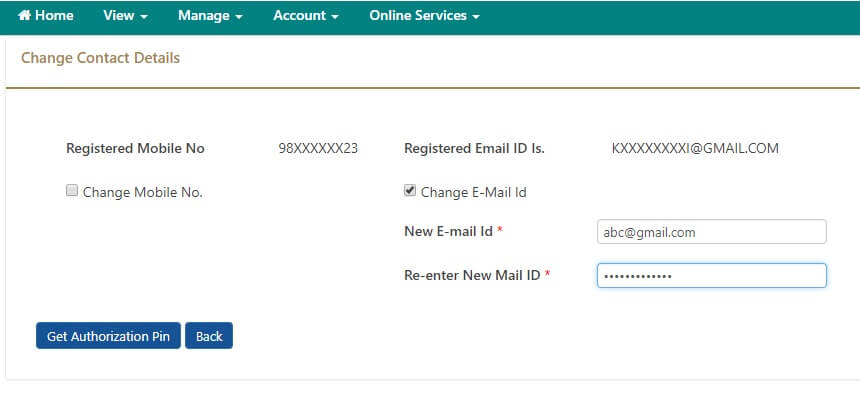
- Click on Get Authorization Pin
- Enter the Authorization Pin sent to your Mobile number registered with EPF.
- Click on Save Changes, Your new email id will now be the Email id registered with UAN website
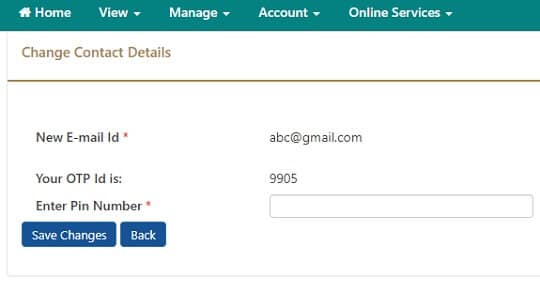
How to change both Mobile Number and Email Id on the UAN website
Email Address of the user can be changed in the EPF Account by following the below process in the UAN Portal
- Login to UAN website with your UAN number and password
- Go to Manage in Menu and Click on Contact Details
- Choose the checkbox next to Change Mobile Number
- Enter the New Mobile Number
- Re-enter the new mobile number same as entered above. The email id will be shown as dots
- Choose the checkbox next to Change Email Address
- Enter the New Email Address
- Re-enter the New Email Address same as entered above. The email id will be shown as dots
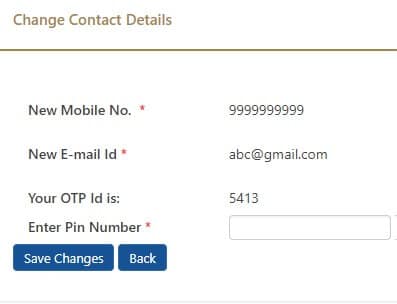
- Click on Get Authorization Pin
- Enter the Authorization Pin sent to your Mobile
- Click on Save Changes, Your new mobile number will now be the Mobile number registered with UAN website and your new email id will now be the Email id registered with UAN website
Related Articles
- Basics of Employee Provident Fund: EPF, EPS, EDLIS
- Understanding Employee Pension Scheme or EPS
- How to change UAN password
- Online EPF Withdrawal: How to do Full or Partial EPF
- How to Transfer EPF Online on changing jobs
- How to register EPF complaint at EPF Grievance website online
- UAN and Registration of UAN

37 responses to “Change Mobile Number or Email In UAN website”
Thank you for sharing this detailed guide on changing mobile numbers and emails in the UAN website! It’s very helpful, especially for those of us who have faced difficulties with the process. The step-by-step instructions made it so much easier to follow. I appreciate the clarity and thoroughness of your writing!
Request Letter Format by Employee to Change Mobile Number
To
The PF Commissioner
PF office address.
Sub: Request to change mobile number (6379096402)in the PF account (101219567126)
Dear Sir,
Here I am writing this to inform you that I forgot my UAN and unfortunately I lost my registered mobile number which was linked to my PF account.
So I am requesting you to please change my register mobile number in PF account to 101219567126 from S Kumar . So that I can utilize EPF online services.
Thanking you.
Regards,
S KUMAR
dear sir please kindly request my uan 100019716123 date borth not mat mach please u my chang my dateborth
Please contact your employer
Hallo sir plese change my mobile number old number 9731762238@new number 9620339314 updateed plees
I have activated my UAN NUMBER 101060480554 but i lost my mobile number & forgot password MY NEW MOBILE NUMBER 9620339314….please help me sir
I have activated my UAN NUMBER 100512899333 but i lost my mobile number & forgot password MY NEW MOBILE NUMBER 9525959777
Please follow last option
How to change both Mobile Number and Email Id on the UAN website
Email Address of the user can be changed in the EPF Account by following the below process in the UAN Portal
Login to UAN website with your UAN number and password
Go to Manage in Menu and Click on Contact Details
Choose the checkbox next to Change Mobile Number
Enter the New Mobile Number
Re-enter the new mobile number same as entered above. The email id will be shown as dots
Choose the checkbox next to Change Email Address
Enter the New Email Address
Re-enter the New Email Address same as entered above. The email id will be shown as dots
Click on Get Authorization Pin
Enter the Authorization Pin sent to your Mobile
Click on Save Changes, Your new mobile number will now be the Mobile number registered with UAN website and your new email id will now be the Email id registered with UAN website
Sir mera mobile no or don Cheng nhi ho pa rha h.mera mobile no 8874746078 ishko basal kar 8650775814 ok activet karna tha..
Dear sir security n personel service
How to change both mobile number chose check box next to mobile number change
Sir
How i can change my new number epf portal but i don’t have old number i am not using also i have to update new number so please help me n this, if i update also OTP is going old number
Mere phone number change ho gaya hai mujhe pf nikal na hai pahle Mera phone number 9205257898 tha
Ab Mera phone number 9771708293 hai
Can you login to the UAN site then you can change as explained in the article
Login to UAN website with your UAN number and password
Go to View in Menu and Click on Profile
You will see the details related to your UAN site as shown in the image below.
You can click on Change to Change Mobile Number or Change Email to change Email id.
PF amount online Withdrawal karne ke liye aap apne registered number ko please Aadhar se link karwa likye tabhi aap online nikal sakte h. kyuki last me OTP aata h wo sirf aapke registered number par hi ayega.
Any Queries, Please write to us
accountszone@yahoo.com
Sir
Mujhe aapki ek request hy sir mera phone number change hugya sir hai mhuje pf nikal na hai sir pehla mera phone nmbr hbi mera pass nhi hai sir abhi mera phn number 6003389927
mobile numbar cheng 918528679
I have activated my UAN but i lost my mobile number & forgot password
My old mobile no to change new mobile no 7353587668
Please contin
ue my uan this no with epf details
Sorry, we can’t do it.
Did you try the steps mentioned in the article?
Did you face any problems or are any steps incorrect?
Please kind change my mobile number new 9137311377 and not get uan number please send uan number for my name
may uan number 100340247721satendera Kumar Father name Gaya Prasad. 9015052094.Old. Carecct Aadhar card and pan card me jo name hai Bo carecct hai Aadhar card Activate hai ye name thik hai new number 9911785127.
Please kind change my mobile number new 7005983807 and not get uan number please send uan number for my name
We can’t do it.
You have to do it on your own.
Did you follow the steps mentioned? did you face any problem?
Hi,
I forgot my password, I want to change it but the mobile number which is linked with PF account is not in use. How to reset the password.
Follow the process of forget password and mobile number changed as explained here
mera mobile number change karwana hai
9625065812
Hi,
I forgot my password, I want to change it but the mobile number which is linked with PF account is not in use. How to reset the password.
Did you try saying changing mobile number and resetting your password?
Our article Change Mobile Number in UAN if forgotten Password and Mobile Number Changed talks about how to Change Mobile Number in UAN online if you have forgotten your password and your mobile number has changed.
Hallo sir plese change my mobile number old number 8686730999@new number 7993764848 updateed plees
We cannot change the mobile number.
Did you try to change it?
What problem did you face?
If you tried to link your Aadhaar with your UAN and were unable to do because of mismatch in Name, Date of Borth(DOB) or Gender in UAN data and Aadhaar data then you can use the new functionality provided in the UAN portal to update details. Article EPF UAN Correction: How to correct Name, Date of Birth, Gender Online in UAN as per Aadhaar explains in detai
A suggestion please use the name which is in Aadhaar
Uan no 100315721143 old mobile no 7834847175 new mobile no 8851075101 please change mobile no
Sorry, we cannot change the mobile number.
Did you try changing it your self?
What problems did you face?
Mera mobile number change Karna hai Mera mobile new 7273923880 hai
MY EPF FORGOT AND REGISTER MOBILE ALSO
SO HOW TO MY REGISTER MOBILE NO CHANGE & PASSWORD HOW TO REMAIND
Change mobile number
I have activated my UAN NUMBER 100512899333 but i lost my mobile number & forgot password MY NEW MOBILE NUMBER 9620339314….please help me sir