A debit card is linked to the user’s bank account. Hence, if the account holder misplaces the debit card, it is at the risk of being misused by the person who gets hold of it. Same is true for a Credit card. Once the user realises that debit card/credit card has been lost, one needs to act immediately. If the user reports loss of debit/credit card within the stipulated time, the bank is legally mandated to protect the user by blocking or freezing the card. This article talks about the steps that one needs to follow when one loses a Debit or Credit Card. It shows how one can block Debit or Credit card through NetBanking, Phone banking etc.
Table of Contents
What to do if you lose Debit Card or Credit Card
- Till you inform the bank about the lost card, you would be responsible for money transactions.
- Inform the bank as soon as possible through net banking, mobile app, phone banking, Whatsapp etc.
- After Bank will block or freeze the card. After that, no one (including you) will be able to use the card.
- If you want a new Card, you would have to request for it. And Pay for it.
- It is recommended that you file an FIR at the nearest police station. It is if a card falls into the hands of criminals and is used for illegal activities. A copy of the FIR is given to the user once it is filed. It is important to preserve the same for future reference.
- Blocking the card is also called as HotListing the card.
Inform the bank about Lost Card
As soon as the user gets to know about the lost card, he should inform the bank through internet banking, calling the bank’s phone banking number, Mobile app, What’s App banking, visiting the bank branch. After logging into the banking portal, the user needs to report loss of card by selecting the relevant card registered in his name and issue an instruction to block the same. A confirmation notification is displayed and notified on the registered mobile number once the blocking is successful.
Get New debit card/New Credit Card
Usually, as soon as the bank takes the request to block the debit card, it accepts the request for issue of a new debit card. The bank may levy a charge for issuing a new card. The new card is usually dispatched to the user within 2-3 business days. Points to note Banks typically have zero liability policy to protect cardholders in case a card loss is not reported within the stipulated time. If the user reports about the loss within the stipulated time, the bank is legally mandated to protect the user by blocking or freezing the card.
All banks have some sort of zero liability policy to protect cardholders, especially if card loss is reported within the stipulated time. This may vary depending upon the type of transaction and reporting deadlines. For example, Axis Bank Ltd gives a time of seven days to report a theft or loss of card. SBI Cards and Payments Services Pvt. Ltd’s website says it’s not liable for any transactions incurred on the card prior to the time of reporting of the loss of the card to it.
How to block Card via Phone Banking
For most banks, Debit Cards/Credit cards can be blocked via Phone Banking. The procedure of how to block the Debit Card/Credit Card by Phone Banking is:
- Call up the bank and authenticate yourself
- Authenticate and confirm the Card details
- The Phone Banking customer executive may ask you for some security questions. So, before you call, be prepared to answer those questions.
- Once confirmed, the customer executive will block your Debit Card or Credit Card.
- You may request a new Debit/Credit Card.
How to block Card using NetBanking
For most banks, Debit Cards/Credit cards can be blocked through Net Banking. The procedure of how to block the Debit Card/Credit Card by Net Banking is given below. We have explained it for HDFC and SBI. For other banks, menu item would be different.
- Login to NetBanking using your NetBanking ID and Password.
- Find the Menu related to credit cards.
- Select “Credit Card hotlisting” or “Debit Card hotlisting” from the Card menu.
How to block HDFC Debit/Credit Card through NetBanking
Here’s how you can hotlist or block your Debit Card through NetBanking
- Login to NetBanking using your NetBanking ID and Password
- Click on Card tab
- Select the Credit Card/Debit Card on Left Hand Side
- Select Request under Credit or Debit Card, whichever applies
- Select Credit Card hotlisting or Debit Card hotlisting whichever applies
- Click on the Card number you wish to hotlist
- Select the reason for hotlisting and confirm
- You will receive confirmation that the card has been hotlisted online

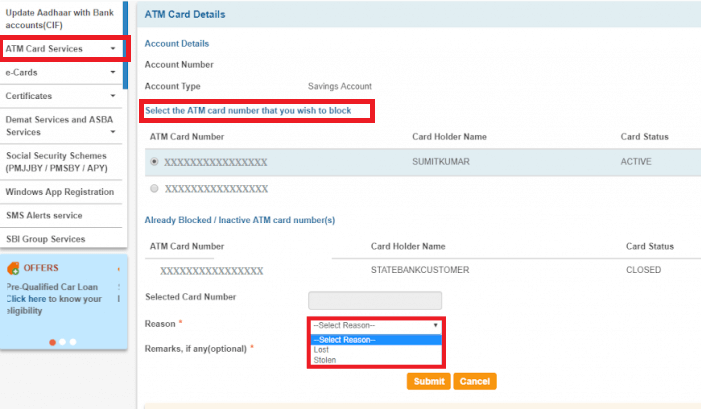
How to block SBI Card online using NetBanking
You can block your SBI ATM cum Debit Card through OnlineSBI, in case your card is lost or stolen. Follow these simple steps to immediately block your card:
How to block card through WhatsApp Banking?
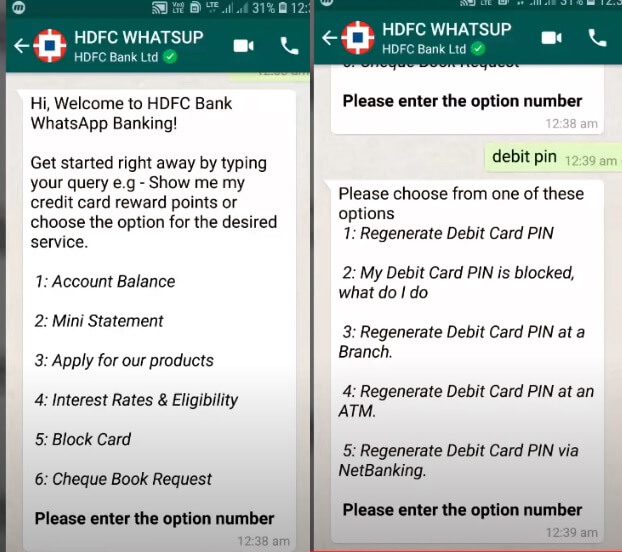
Now you can do basic banking with WhatsApp. On WhatsApp, you can ask and get details relating to your account via WhatsApp, but you can’t carry out any money transactions. WhatsApp banking services are now offered by HDFC Bank, ICICI Bank, Kotak Mahindra Bank, Saraswat Bank, AU Small Finance Bank, etc.
To avail WhatsApp banking services, you first need to give a missed call from the registered mobile number to the relevant number provided by the bank on its website. This number is different from the phone banking number of the bank. By giving a missed call, you basically provide your consent to the bank for using this service.
You will receive a welcome text message from the bank’s WhatsApp number. You should save this WhatsApp number of the bank in your contact list. Banks do not charge anything for availing WhatsApp banking services. If one doesn’t like, one can opt-out of WhatsApp Banking services.
Our article WhatsApp Banking: Features, How to use, HDFC Bank, ICICI Bank, Kotak Bank etc, covers WhatsApp Banking in detail.
Related Articles:
- When you lose your mobile : What to do?
- When you lose your wallet, Credit Card, PAN Card, Driving License
- Duplicate Driving License: How to get Duplicate DL Online or Offline
- WhatsApp Banking: Features, How to use, HDFC Bank, ICICI Bank, Kotak Bank etc
- Cyber Crime : Credit Card Fraud,Bank Account Hacked
Have you lost a credit card/debit card? How did you get it blocked?

One response to “What to do if you Lose Debit Card or Credit Card? Act immediately”
[…] Visit Direct Link […]