On 17 Oct 2017, EPFO launched an online facility for its subscribers to link their 12-digit unique Aadhaar number with their Universal (portable PF) Account Number (UAN) on Oct 2017. Using new facility eKYC at EPFO’s website www.epfindia.gov.in,EPFO members can online link their respective UAN with Aadhaar. In this process, your employer is not involved. Use eKYC portal if your Aadhaar is not linked with your UAN. Your details in UAN such as Name and Date of Birth should match Aadhaar.
Table of Contents
Overview of How to link Aadhaar with UAN using EPFO eKYC Portal?
Overview of Steps for linking Aadhaar with UAN using new eKYC EPFO portal are given below. In this process, your employer is not involved. If there are any discrepancies (for example your name in UAN can be different to the name provided in Aadhaar), you need to get them corrected either in UAN (through your employer) or in Aadhaar card.
If your Aadhaar is already linked with your UAN you don’t need to do this. Section How to Verify your KYC (PAN, Bank Details, Aadhaar) in UAN explains that in detail.
- Go to EPF website http://www.epfindia.com
- In Online Services section select eKYC Portal.
- On clicking eKYC portal you will be taken to new eKYC portal. This portal contains two sections.
- The first section is for EPFO field officer and second for EPFO Member. As you contribute to EPF you are a member. In EPFO member section click on “LINK UAN AADHAAR”.
- You will be taken to a new page where you need to provide your UAN after the mobile number which is linked to UAN gets displayed.
- click on “Generate OTP” button.
- Enter the OTP, which you have to enter and provide your Aadhaar number.
- After the successful OTP verification and if your personal details between UAN – Aadhaar match then Aadhaar will be linked to your UAN.
- You can also track whether UAN is linked with Aadhar using eKYC portal through TRACK EKYC.
Why Link Aadhaar with UAN for EPF?
- It is mandatory to link Aadhaar with UAN for online claim submission.
- Claim settlement will be faster if your Aadhaar is linked with UAN.
- If your UAN is linked with Aadhaar it becomes easy to merge multiple UAN numbers.
KYC and UAN for EPF
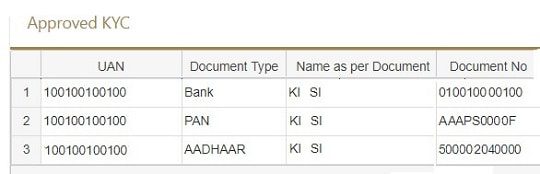
KYC means know your customer.If you have your KYC details in your UAN and they are approved by your employer then dependency on the employer goes away. To withdraw you can directly approach EPFO. After logging on to UAN Website(https://unifiedportal-mem.epfindia.gov.in/memberinterface/) you can click Manage->KYC to see or add your details. You can add details like PAN, Aadhar, and Passport for KYC. The Image below shows the Approved KYC details. If you have Aadhar linked and approved by your employer then you would see it in Approved KYC section.
You should have at least Bank Number, Aadhaar linked to your UAN. It is good to have PAN linked also. (When you do EPF withdrawal before 5 years as TDS is deducted)
How to link Aadhaar with UAN using EPF eKYC Portal?
Steps for linking Aadhaar with UAN using new eKYC EPFO portal are given below. In this process, your employer is not involved. If there are any discrepancies (for example your name in UAN can be different to the name provided in Aadhaar), you need to get them corrected either in UAN (through your employer) or in Aadhaar card.
- Go to EPF website http://www.epfindia.gov.in
- In Online Services section select eKYC Portal.
-
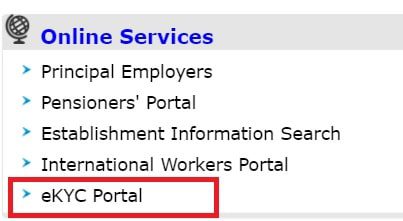

EPF eKYC portal for linking Aadhaar with UAN - On clicking eKYC portal you will be taken to new page the eKYC portal. This portal contains two sections.
- The first section is for EPFO field officer and second for EPFO Member. As you contribute to EPF you are a member. In EPFO member section click on LINK UAN AADHAAR
-
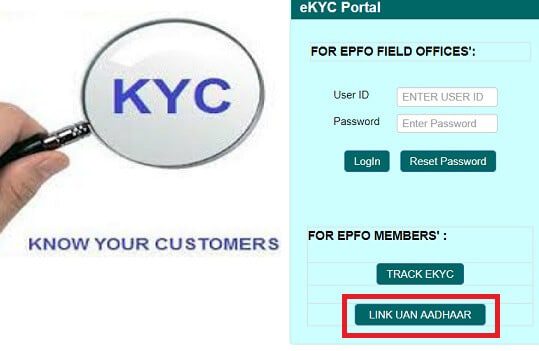

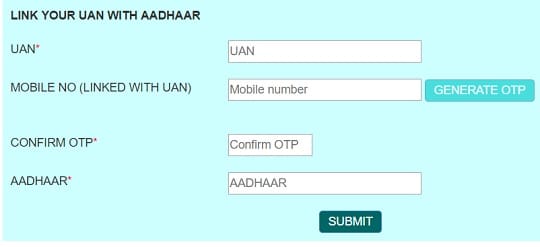
Link Aadhaar with UAN using eKYC portal without employer approval - You will be taken to a new page where you need to provide your UAN after the mobile number which is linked to UAN gets displayed.
- click on Generate OTP button.
- Enter the OTP,
- After the successful OTP verification and if your personal details between UAN – Aadhaar match then Aadhaar will be linked to your UAN.
How to Track Linking of UAN and Aadhaar using eKYC Portal
It’s easy to keep track of your whether your UAN is linked with Aadhar using eKYC Portal.
- Go to EPF website http://www.epfindia.gov.in
- In Online Services section select eKYC Portal.
- On clicking eKYC portal you will be taken to new page the eKYC portal. This portal contains two sections.
- The first section is for EPFO field officer and second for EPFO Member. As you contribute to EPF you are a member. In EPFO member section click on TRACK EKYC.
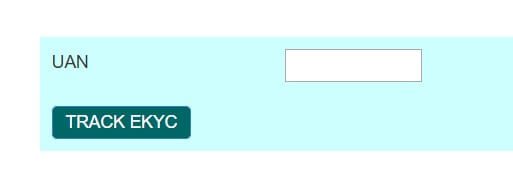
- It takes you to another window, where you need to add UAN number as shown in image below

165 responses to “eKYC Portal of EPF Link UAN with Aadhaar without Employer”
Hi Team,
After logging to https://www.epfindia.gov.in/site_en/index.php, upon checking for the online services, no option for eKYC Portal.
my birthdate epfo & aadharcard is different. how to Link UAN with Aadhaar?
Web service not able to provide requisite detail, kindly try after some time.
Try the EPFO website early morning before 9 am or after 6 pm
Hi
Good Evening
sir
My KYC & Adhaar is not updated in my UAN.
in my UAN a/c my Name “PARMINDER SINGH” is and on my adhaar my name is “PARMINDERJIT SINGH”
I will try two three times from Basic Detail Change add my Adhaar but after some days shown this Error INVALID MODULE REFERENCE. NO DATA FOUND.
Please help Me.
Contact your employer or file a complaint as explained in http://bemoneyaware.com/epf-grievance-complaint-online/
Hi in my kyc bank details is showing Automatically invalidated what to do further to Validate
Contact your employer to validate the bank details
he is not responding is any other way to validate.
Raise a complaint at EPF grievance website
as explained here
I’m getting mentioned error while updating account number on my UAN account (This functionality will be available, once your UAN is linked to any establishment)?
204 Views
in process of doing eKYC on “https://iwu.epfindia.gov.in/eKYC/LinkUanAadhaar” portal… after entering UAN number… getting following error:
“Web service not able to provide requisite detail, kindly try after some time.”
Can you please help me in this?
[…] 9. eKYC Portal of EPF Link UAN with Aadhaar without Employer […]
Hi,
My KYC details are pending to be approved by employer, but my company is closed and no one has access to approve my KYC details.
So, what should I do to make my details approved without employer, so I can withdraw my PF money.
Hoping something concrete.
Please raise a grievance at EPFO How to register EPF complaint at EPF Grievance website online
Mera PF advance reject ho gaya.
Reason mentioned
(1) PDF file of claim not open.
(2) Fathers name differs.
My father name is correct in UAN portal and matches with PAN.
But Father name is not mentioned in Aadhar card.
Abhi mujhe kya karna sahiye pf withdraw karne ke liye
Mail ur mobile no on skjha28june@gmail.com
Meri full kyc hai but kyc pending q show ho rhi hai main kisi company mein employee nhi hu
When you were working was your KYC approved by your employer?
Login to UAN member portal. https://unifiedportal-mem.epfindia.gov.in/memberinterface
Check Manage->KYC and see if any KYC is pending for approval
contact 8209404983
Web service not able to provide requisite detail, kindly try after some time
Today on 12th March, FO has accepted my Aadhar details and it is coming as Demographically verified. Thank you for this 🙂
However in front of PAN nothing is mentioned not verified or not even unverified(in Home page of EPFO site).
I went to check that if my PAN and Aadhar are linked (https://iwu.epfindia.gov.in/eKYC/LinkUanAadhaar) and it is correctly linked.
I don’t know now how to get PAN verified, can you please help me?
Many thanks 🙂
my bank details is mentioned wrong, i have reentered but employeers is not approving how to do help me out
All PF related case or issues tell me. I will be resolved. Thanks
Whatsapp No. 9671961283
Email Id: divanshu813@gmail.com
Kyc Kar do please sir
UAN no.101205560444
Please ask your employer.
100834860619
Ismein bank account Nahin connect ho raha hai please help me answer
9998868602 whatsapp number any problum any time halp in epfo
Right side of my home page i see AADHAAR BOX it shows verified ( Demographic ) without AADHAAR number like in my AADHAR BOX : NOT available Verified ( demographic ).but if i click basic details it shows My AADHAAR number and status shows as Accepted by mumbai Field Office – OK.
* In my home page it shows my pan Number with Verified Status
* can i withdraw my whole amount without AADHAAR is it Possible ? using my PAN number
so could you clarify my doubts my aadhaar is verified or i need to update my aadhar once again?
Dear Team,
This is inform you that your team wrong data Updated in EPFO Side .so please look in to this issue
WHat data has been updated wrongly?
Mera canter EPFO Ka nam d/o s/o Aadhar Nahi dalrahi kaykarna chaiya muje prblam hi advansh chaiya please help me
When I provide the UAN number it gives me this message… “Web service not able to provide requisite detail, kindly try after some time”
I am getting the same thing, did you found any solution for it?
got it?
I am also getting the same error… Can you please tell me the solution?
Hi, I want to update Pan & Bank details at UAN portal. I did it online but it appeared in KYC pending for approval box. I told company for approval but they are saying they r not getting any request for update. what should i do whether i should submit documents to employer. And my Pan card details not showing in Digitally approved KYC Box.
My uan no pe my father name s rong
Kyc uan adhar pan
Nice article EPF UAN Activation.
My employer created short name and now i am not able to link Aadhar or PAN. Only bank account is linked? my online submission getting rejected due to name difference and I don’t have proof with short name.. what can be done i this case?
Modify Basic Details
Please go through the article EPF UAN Correction: How to correct Name, Date of Birth, Gender Online in UAN as per Aadhaar
Mera epfo a/C men DOB galt h DOB PROOF DENE KE BAD THIK NAHI HUA KYA KAEU
Send me email on php1208@gmail.com. I will help you
Please email me on php1208@gmail.com
I am already raised the request for change my Date of Birth as per my Aadhar Card and request accepted by employer but show approval is –> Pending at NOIDA field office.. Please suggest what would i do because almost 12-15 days is over and same status show ..
My UAN No :- 100434620974
My UAN Registered No 9536032125
Regards
Sunil Kumar
Please raise EPF grievance as explained in our article.
How to register EPF complaint at EPF Grievance website online
I have used this website http://knowandask.com/whats-epf-and-how-to-withdrawn-epf-online/
and followed all the steps and it’s good..
But how can i update my bank account number without employers permission.
Its not there in that website. Can you tell me..
Im getting an error (ASA014: Error connecting to CIDR – Connection timeout) after updating my UAN, mobile , aadhaar and captcha it’s the next page where it will send my 2nd OTP to sms / email . Any idea what can fix this?
Wait for a day and try again
i need with to withdraw my pf balance,, but i tried many times..
it may asking to update my father name details..
but i cant update my father name in that.. is there any possible to add my father name in uan member portal
Please visit the Regional EPF office with required documents
Our article How to find your employer’s EPFO office and EPFO office Phone Numbers explains it in detail
hi bro no need to apply your father details in pf portal you can with draw directly
if you want any help please contact this num 9676149053 my name is raghuram
To withdraw pf balance final step it’s asking to generate OTP which will be sent to my adhar registered number… But unfortunately I don’t have either that registered number nor Email.. Can someone please help me in this…
Thanks in anticipation
we can t do anything in that you have to update your mobile num in addhar
Hi,
I have verified and change my details as per aadhaar in UAN; but I want to change my name spelling in aadhaar card. If I change aadhaar card spelling it will be updated in UAN automatically or create problem in my PF account.
kindly advice and thanks in advance.
It might create problems.
Any specific reason for changing the spelling?
Father’s Name kaese change karen plz kuch Online upay ya tarika nikaliye sir ji
PLZ……
why emplyer not approved members uan kyc, this is not fare. if you face any problem register your epf grievance. also use this link adhaar-uan-kyc-without-employer-approval/ to register uan with aadhar without employer.
if My UAN is already Aadhaar verified, then how to allowed change in my basic details.
i am trying to modify my basic detail The message appears adhaar already verified your detail are not editable plz tell what to do.
Then only way to change is to submit the application for change through the employer.
So, I’ve worked in 2 companies (A, B) so far whose job experience I do not want to disclose to my new company which I’m going to join (C). When I login to my PF portal, I can see my service history.
Now, I’m 100 % sure that when my new company (NC) verifies my work history, I wouldn’t get caught as I’ve staged everything perfectly with the fake experience in a startup (S).
But, here’s what I’m afraid of. I hold a UAN number and two PFs from my actual past employers.
1. I want to hide this UAN and PF details in my new company. I’ll say I’ve never had PF so far as my previous startup did not have PF facility as it has less than 20 employees anyway. Will my new company create a new PF number to me?
2. What are the adds that they could get to know my actual experience using my Aadhaar number?
3. What are the other suitable options for me to make sure I wouldn’t caught?
I would appreciate if someone helps me here.
Hai sir iam vijay in my pf account linked my bank account its showing pending for approval till 5 days ,how much time to take approved sir.
I have couple of problems. I will list them one by one.
1) My AADHAR has name after marriage and my pan and UAN have old names. My employer has already approved my pan details. Now the system is not allowing me to link AADHAR. What I have to do? Correct UAN, PAN and my bank account name? Or only UAN. Even my passport has name after marriage.
2) Does my bank details also have to be approved by my employer? If so , then my bank account has old name in it. Does this mean that this also needs update?
3) I am not working for the employer anymore and I am not able to update my KYC in epf portal. I am getting the below error : This functionality will be available, once your UAN is linked to any establishment. What I am supposed to do now
4) Instead of modifying all these documents (PAN, bank account, UAN etc) Can I withdraw PF in old fashion?
On top of all these i have my DOB wrong in AAdhar which needs to be fixed after correcting all the above problems.
I am tired of all these stupid processes. Please advice me on how to proceed. I really need help.
uan no My date of brith rong. Plz sir helf.
My aadhar date of brith 12/01/1989.
My rong date of brith 01/12/1989
Mujhe bhe yahe presane h kya kru
When I was trying to append my PAN?Bank details,I get the following error-” This functionality will be available, once your UAN is linked to any establishment.”
What needs to be done?Any suggestions?
Have you opened your UAN account yourself through Aadhaar?
If yes, you cannot add PAN or Bank Details as there is PF account or Member Id linked to the UAN.
Once there is a contribution by an employer PAN/Bank Details would be allowed as they have to be verified and approved by the employer.
When I was trying to append my PAN.Bank details,I get the following error-” This functionality will be available, once your UAN is linked to any establishment.”
Can you plz suggest to me how it will update correctly…
As you generated the UAN based on Aadhaar yourself, you cannot update your KYC as there is no employer who can verify your details.
Once you join an organization then your employer will ask you for your PAN and bank account number and update it.
Is there any other way to update KYC (AADHAR and ACC details) without joining any organization.
No, sadly there is no way.
As the KYC needs to approved by the employer.
While trying to appending my PAN/Bank details,I come through the message error says,” This functionality will be available, once your UAN is linked to any establishment.”.
What needs to be done?Any suggestions?
same error came to me..
I Updated my aadhaar details FOR KYC PF,bank details , etc till today not Accepted please confirm as possible as earlier for my personal requesting sir/madem.
What is the status? When did you file it?
Has it been approved by the employer: If No then Please request your employer to do it.
Are you waiting for EPFO to approve? Then file a complaint at EPFO website as explained in our article How to register EPF complaint at EPF Grievance website online
What to do to update bank details of employer is not there and company is shutdown.
SIR I HAVE NOT REGISTER MY MOBILE NUMBER IN ADHAR CARD.SO I CANNOT LINK ADHAR CARD TO MY UAN..HOW CAN I ?
You need to get mobile number registered in Aadhaar.
You need to visit the nearest enrollment centre to add your mobile number. No additional documents are required.
if you are visiting an enrolment centre for the correction/update you need to pay a fee of Rs 29.50(25 + GST) each time you get your details updated.
Step 1: Visit the Aadhaar Enrolment/Update Centre
Step 2: Fill the Aadhaar Update Form
Step 3: Enter only your current mobile number in the form
Step 4: You need not mention your previous mobile number
Step 5: You do not have to provide any proof for updating your mobile number
Step 6: The executive will register your request
Step 7: You will be handed over the acknowledgement slip containing the URN
Step 8: A fee of ₹ 25+GST has to be paid for availing this service
Hi,
I have verified and change my details as per aadhaar in UAN; but I want to change my name spelling in aadhaar card. If I change aadhaar card spelling it will be updated in UAN automatically or create problem in my PF account.
kindly advice and thanks in advance.
Change of spelling in Aadhaar will not be updated in UAN.
You would have to go through the process of changing the name in UAN, approval from the employer, PAN Verification.
What is the name in PAN card?
We would request you to take one spelling and stick to it in all your professional/tax related documents.
If current spelling in Aadhaar/UAN/PAN match then just let it be.
As Shakespeare said, “What’s in a name?”
There is a mismatch in my gender. It is showing as ‘Male’ the correct gender is ‘Female’. My Adhaar is approved and verified in UAN portal. How do I change my gender.
MY ADHAR NO LINKD MY UAN NO. BUT MY BANK A/C AND PEN NOT LINKED IN MY UAN. I ALSO KYC UPDATED PF PORTAL BUT EMPLOYER ARE NOT VERIFY APPROVED KEC. WHAT I DO?
Raise an EPG grievance.
How to register EPF complaint at EPF Grievance website online explains it in detail.
Then tell your employer about it.
Hiii.
My UAN login others KYC is details showing. I was tried in modification changes but in modification changes other Adhara number seeded .. even though i need to change my basic details & also need to other KYC Details in my account..
KYC details is possible. But for updating other details you need to submit an application to EPFO through your employerThere is a prescribed format for this application. The sample form of the correction in EPF details is shown in image here.
Sir, My UAN No. Is 100433988068. I have been trying to link my Aadhar with this UAN. I am putting my Aadhar number in the box and the name, but I am getting the message, “Invalid Gender details for AADHAAR authentication”. Please advise how I can do the same without approaching the employer (because the unit is closed)
Please check your profile after logging in to UAN site.
Go to View->Profile to see your details.
If the details are missing then refer to our article How to get UAN Missing details updated by Employer for more details.
If they are invalid you need to get it corrected by your employer as explained in our article EPF UAN Correction: How to correct Name, Date of Birth, Gender Online in UAN as per Aadhaar
Hi,
I just did eKYC by authenticating with Aadhaar, following the instructions in this article. Many thanks for this article, without which I would not have known about this process. (Why the EPFO must scatter their functions across multiple websites is beyond me).
I got the following message, so I am optimistic. But I have just one question:
I have another UAN linked with my (same) Aadhaar. Will that be an issue? Will that prevent the Aadhaar from linking.
Dear Member,
Your Aadhaar Details XXXX XXXX XXXX against UAN XXXX XXXX XXXX
has successfully been verified.
Details will be updated by 28-03-2018
How to link PAN with epf
My aadhar is already link with epf
You can update your KYC information in your EPF account online using UAN EPFO portal.
Login to your UAN website
click on the Manage tab.
In the Manage tab, select the KYC option.
Under the KYC details, select the checkbox for PAN
Add the PAN number, Name as per the document
Click on Save
If there is no error, then these documents appear in Pending KYC section.
You have to wait for the employer to approve the KYC details.
After approval by your employer, these documents appear in Digitally Approved KYC as shown in the image here.
Hi, I have Adhar and Pan mismatch case. I have modified basic details and its sent to my employer for approval. But my employer is asking for my Member login id and password from me. The employer has the access to employer PF and using that he can approve “my basic detail”. I am not comfortable giving my id password since employer has access to everything and why does he need to ask me for my login id and passowrd. what can I do? please suggest.
Hi Sir,
My name is mismatched in UAN portal so I was updated as per documents and received approved message also the name has been changed correctly but in main screen aadhar shows ” Aadhar – Verified(Demographic)”.
In this case I’ve applied of online withdraw on last tuesday still its in under process, so it will get delay due to this aadhar? and how many days it will take to complete the process?
No Aadhar Verified means your Aadhar details have been verified.
If you could submit the claim online then it should take 3-20 days for the money to be credited to your account.
You will get regular updates though SMS.
uan no. 100182577404 se adhar link nahi ho raha hai plz help
What is the problem that you are getting?
What steps have you followed?
uan no. 100330184633 se adhar link nahi ho raha hai plz help
kya problem aa rahi hain aapko?
Please email me on php1208@gmail.com
dear Sir ,I want to activate my UAN number 10086827630 I have my pf number 423428 Please send it to my mail id : tkjha.advisor.lic@gmail.com
You need to activate it yourself.
Once you receive the Universal account number or UAN from your employer, you have to go to the official website UAN website‘
Our article UAN or Universal Account Number and Registration of UAN explains the steps in detail.
Click on Activate UAN.
Enter the details and Click on Get Authorisation PIN
You will receive an authorisation PIN on your mobile. Click on Submit button.
Webpage will show that member’s credentials are verified. This screen allows the member to create the password for login to this portal to have an access to the facilities provided in the UAN Member Portal. User Name will always be your UAN. This completes the registration
After submitting the, screen will come and the message will go to the member’s phone for successful registration to access UAN driven member portal. Member must record this username and password to use it further. Remember your UAN would be the user ID
Dear Sir,
I have requested for Name correction in UAN portal through ModifyBasicDetails and it is approved as well by both Employer & EPFO field officer.but the Corrected Name is still not reflecting in UAN portal.
When i raised a grievance,The regional PF office is saying that the details are updated in their records but for reflecting in UAN is some technical related issue and provided me a mail Id to drop email to “employeefeedback@epfindia.gov.in” .but after dropping an email they are saying that it is handled by regional EPFO office.
Kindly help me sir,how can i resolve my issue.
Dear Sir,
I have requested for Name correction in UAN portal through ModifyBasicDetails and it is approved as well by both Employer & EPFO field officer.but the Corrected Name is still not reflecting in UAN portal.
When i raised a grievance,The regional PF office is saying that the details are updated in their records but for reflecting in UAN is some technical related issue and provided me a mail Id to drop email to “employeefeedback@epfindia.gov.in” .but after dropping an email they are saying that it is handled by regional EPFO office.
Kindly help me sir,how can i resolve my issue.
Sir I resigned in last compony.I hd correct my name. But now my aadhar and PAN is not suport with uan by KYC aproval. There seen athurisation error.
Yes once you leave the old company they cannot do KYC approval.
You would have to approach the Regional EPFO office or submit claim offline
dear sir Ji mere name me creation karna h lekhin on line nhi ho RHA
sir i am linked my aadhar with my UAN portal
but my bank account and pan are not link with my UAN. Can i withdraw my epf with offline form
Howcan mo no link to uan?
An employer can link your mobile number to UAN while generating the UAN.
What is the issue that you are facing?
Sir,
My Pan was verified and aadhar was not verified because of father name spelling was mismatch. Can i withdraw the pf offline by filling the form or it will get reject please reply
You can withdraw the PF offline by physically submitting the form.
In any case submit an application for correction of Father’s name through your employer to EPFO.
Dear sir
My aadhar not authentication message showing but I correct name update and my employer also approved last 1 months it is pending to epfo filed officers last 1 months so how many day after approved epfo filed officers approved plz suggest me
sir my adhar is not approve in my kyc.it is in pending in pf regonal office .rest every document is approve.sir plese help me
Please raise the grievance at EPF.
The article How to register EPF complaint at EPF Grievance website online explains the process in detail
Please raise the grievance at EPFO.
The article How to register EPF complaint at EPF Grievance website online explains the process in detail
Sir my UAN number is activated in epf account.all the details such as pan card,saving account linking is done by the employer.however adhaar card is not linked with the account.i have tried updating it using online services but again request is pending at the employer end. I have resigned from the company few months back.Employer is creating hurdles in my clearance and pf withdrawal.plz guide how adhaar card be linked with epf account without taking employeer consent for pf amount withdrawal.
Grr..so bad of employer. Is there a reason why he is doing it?
Try to resolve it if possible.
Yes you can get Aadhaar approved without employer consent for PF amount withdrawal.
You can visit the regional EPFO office with details.
You can also raise a grievance with EPFO. Our article How to register EPF complaint at EPF Grievance website online explains it in detail.
dear sir
Adhara number ,pan card or bank details
https://unifiedportal-mem.epfindia.gov.in/memberinterface/
portal par approved ho gyi h kya m PF withdrawal ke liye from direct pf office bej sakta hu….
I followed these steps to link my UAN to Aadhaar number. However, after filling in all details when i click on SUBMIT, on the next page it says “Proceed for verification” and when i click on it, then i see the error message “Your connection is not private”. How to go further on this?
Basically, “Your connection is not private” or “Net::ERR_CERT_DATE_INVALID” error appears on screen due to the SSL error . SSL (secure sockets layer) is used by websites to keep all the information you enter on their pages private and secure.
Click on Advanced and see the error.
You can understand more about the problem by checking out the video like this
Please help me with the direct link to ‘online services’ .. I am not able to choose that from drop down at https://unifiedportal-mem.epfindia.gov.in/memberinterface/
I am trying to do early PF withdrawal. I have already linked the aadhar. I need online adhaar based submission form
Sadly there is no direct link.
Try it again by logging in to the UAN website.
If not then please send the picture of it to bemoneyaware@gmail.com
You can raise the issue with EPFO by going to their twitter or facebook account and tagging us.
Twitter account of epfo
Facebook account of EPFO
My marrital status is not available showing in my profile..is it any problem for my epf withdrawal or not..plj sujjest me?
Please ask your employer to update it.
Marital status is important from the EDLI(insurance) & EPS perspective.
The lifelong pension is available to the member and upon his death members of the family are entitled to the pension.
EDLI or Employee’s Deposit Linked Insurance Scheme provides a lump sum payment to the insured’s nominated beneficiary in the event of death due to natural causes, illness or accident.
dear sir
KYC APPROVED KESE HOTI H
Employer approve karte hain
if employer doesn/t do that, then what we do.
Hi sir my name is pardeep Kumar and my kyc has been approved but when I am trying to fill my claim form than there are showing on message that your father’s name is not available here.
So what should I do.pls help me
Ask your employer to update the details.
sir plz tell me how to link pf with bank acc no and with pan no without help of employer. I have seed my pf with aadhar.
If you are working then we would recommend you update it on UAN site and get it approved by your employer.
If you are not working then you can approach the regional EPFO office.
Please visit the regional EPFO and submit the details. I
you can find the Regional EPFO office by clicking on appropriate Zonal EPFO Office under Contact us on EPFO website or click here
If you can mail your PF number to bemoneyaware@gmail.com we can help you in finding your EPFO office.
Can you login to your UAN account? Is your UAN activated? Can you check the Passbook?
Do you have proof in terms of payslip from your employer?
Sir.
Ham aapna UAN no.active kar liye h or user id and password bhi bana ke passbook download kar liye h. Lekin jab ham aadhar card link kar rahe h or TOP no bhi ok kar dene ke bad error bata raha h ki aapka aadhar card se UAN no mach nahi kar raha h.
Hamara aadhar card pe kamlesh rout
Jab ki UAN pe kamlesh Rawat h.
To kis tarah name sudhara jaye….
Plz. Koe aap ye tarika
sir mera ekyc reject ho gya field office se required documents likh ke aa rha h kya kare kch help kariye please. aur mene job bi change ki h
EP G NUMBARN 100222242608 aadhar 285004560034 link kar Diya jaay thank you
यह तो आपको खुद ही करना पड़ेगा.
आपने अपना आधार kyc में जोड़ा क्या?
आप ने यहाँ दिए हुए steps follow किये क्या?
आप कहाँ तक गए?
Hello Sir,
Which one is the better option – Updating the NAME in Adhaar card or UAN, as I am not working at present?
Updating Name in UAN is easier, go in Modify Basic details and update name as per Adhaar, the request will be send to your Employer directly, wait for 15 days and check the status upon approval just go and click on verify it will be done
Where will be this verify button?
In the member profile section.
Which name do you want to stick with officially and for which you have supported documents,
It would be better submitting request to EPFO with your ex employer sign a request for name change
how to update my gender in my uan
Is your gender missing or it is wrongly entered?
My kyc not update employer plz help
Why is your employer not updating KYC?
I think I have linked Aadhar with epf . But when I login & show my profile it don’t update my Aadhar. So I want to know when will be update my Aadhar after linked and I have an another question that -does Aadhar card show at last in the Aadhar linking with epf process
My date of birth not matching to my uan number, help me sir
yes sir my date of birth not matching
Are you still working?
Can you login to UAN website using your Login?
If there are any discrepancies (for example your name in UAN can be different to the name provided in Aadhaar), you need to get them corrected either in UAN (through your employer) or in Aadhaar card.
If you can login to UAN you can submit application for correction of Date of Birth, as explained in the article How to Correct EPF Details like Name,Father Name,Date of Joining
The process involves employee raising the online request by logging onto UAN website. The request will then be forwarded to Employer you can approve or reject the request online. If the employer approves then request will go to EPFO Field Office where Dealing Assistant, Section Supervisor and then APFC/RPFC will reject or approve the request.
8853791935
It shows as my UAN is invalid. I have entered the proper UAN details.
Did you recently get UAN?
Have you registered your UAN?
Verify that your UAN is correct.
You can go to UAN portal and look for Know you UAN Status which you can see in this image below important Links.
Enter the details given below and Click on Get Authorisation PIN
Id which can be
UAN,
Member Id
Aadhaar
PAN
Name
Date of Birth
Mobile Number
Email Id (Optional)
Captcha ( banks in image below)
If you are OK then send your UAN to our email id bemoneyaware@gmail.com
other than name my details in UAN is correct is it possible to link aadhar ?
Yes, you should be able to link your Aadhaar.
If you face a problem do let us know.
How many days takes to link Aathar by ekyc portal plz update my adhaar
How many days takes to link Aathar by ekyc portal
Approval date is not fixed – it can be anything from 3 days to 30 days.
I have linked my adhaar with UAN 3 weeks ago and the same is showing that my credentials are verified. But when I login to my UAN portal, my Adhaar has not been updated there till date. Now what to do??
You can Raise the grievance at EPF grievance at http://epfigms.gov.in/
You can raise it on social media twitter.com/socialepfo or
facebook https://www.facebook.com/socialepfo
If possible to tag us also. @bemoneyaware
I have verified my aadhar number one week ago, but till now aadhar details are not updated. Whenever I am tracking ekyc it is repeatedly showing on next day date your detils will be updated.
adhar no as karne ke bad confirm code nahi ata he.
क्या आप वही मोबाइल नंबर इस्तेमाल कर रहे हैं जो आधार से लिंक्ड है?
आप अपने डिटेल्स हमारे ईमेल पे भेज देंगे तो हम कोशिश कर सकते है?
How many days takes to link Aathar by ekyc portal
EPF said it would done in 1 day but I guess you can assume a week