To ensure taxpayers are able to protect their e-filing against any possible misuse, the Income Tax Department has introduced a new facility,free of cost, called E-filing Vault in Apr 2016. So now you would have to verify twice, once using your PAN and Password and second time using high security e-Vault feature. Lets look at the current process of Logging in to Income tax e-filing website and new Income Tax E-filing Vault facility introduced in detail.
Table of Contents
Overview of Logging in to Income Tax E-filing website and Resetting password currently
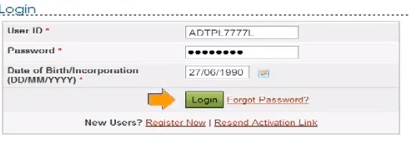
To Login to the Income Tax E-Filing website one needed the PAN number and Password that you created when you registered for income tax e-filing. Our article Registering on Income Tax efiling Website explains it in detail.
How to Reset Password of Income Tax e-filing website?
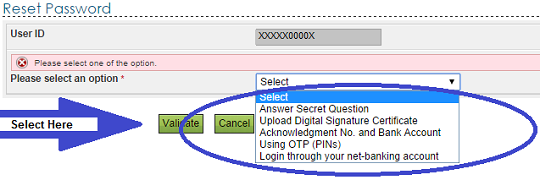
Many people forget their password of Income Tax India E filing website. Many are not given password by their tax advisers/CAs who file their return. But now Income Tax department has given many ways to reset the password at income tax e filing site. You can reset password at Income Tax return Filing website by either Clicking on Forgot Password on Login screen or going to Reset Password and Choose one of the options below as shown in image below.
- Answer Secret question
- Upload Digital Signature
- Through Acknowledgement Number and Bank Account
- Through One Time Password (OTP)
- OTP at Old Email ID and old Phone Number
- OTP at New email Id and New Mobile Number
- Provide any TAN In Form 26AS
- CIN detail of challan deposited by Assessee
- Bank Account Number
- OTP at Old Email ID and old Phone Number
- Send Pan details To Income Tax Department.
- Login through your Net banking
Steps involved in E-Filing Vault-Higher Security Process
It provides an additional layer of security to your e-filing account in addition to login and password. Its like putting another lock. Please note:
- Using Income eFiling Vault feature is Optional
- You can select High Security Option any time
- You can deselect High Security Option any time
- Use E-filing Vault High Security if you are OK with using Lock Reset Password Options using Net banking.
Refernce: Income Tax e-Vault Document
Step 1 Login to e-Filing portal using your PAN and password.
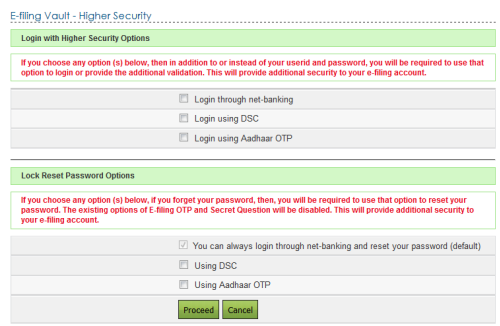
Step 2 Go to Profile->Settings->E-Filing Vault-Higher Security. As shown in image below, you need to choose which option will you use for. One set, user will be allowed to login and Reset Password only with the selected option(s)
- Login with High Security Options: You can choose only one option. Choices are :
- Login through net-Banking : Users should have logged-in to eFiling portal through Net-banking atleast once to avail this option
- Login using DSC : Users need to register Digital Signature Certificate before opting for Login Using DSC. To register DSC, Go to My Profile ->Register Digital Signature Certificate
- Login using Aadhaar OTP(One time password) : Users need to Link Aadhaar to the PAN before opting for Login Using Aadhaar OTP. To Link Aadhaar, Go to My Profile->Link Aadhaar.
- Lock Reset Password Options: You can choose only one option. Choices are same as above,Login through net-Banking,Login using DSC, Login using Aadhaar OTP . If you choose this facility and forget your password then you are required to use this option to reset your password. The existing option of Efiling OTP and Secret question will be disabled. Reset Password through net-banking is the default option (default means it is already ticked, as shown in image below).
Login in to Income Tax E-filing website with Higher Security Options
Using eFiling Vault Option of Logging in to Income Tax E-filing website through net-banking
If you choose Login through net-banking, along with e-Filing User ID and Password, you will be required to login through Net Banking. This ensures additional security to your e-Filing account.
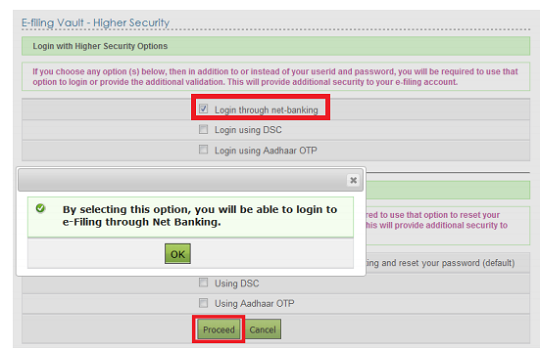
You need to select the option, Login through net-banking ,(click on checkbox next to Login through net-banking,a tick will appear)
Once you select the option(click on checkbox next to Login through net-banking,a tick will appear), confirmation shown in image below appears. Click button OK and click the Proceed button.
Please note the same form takes Lock Reset Password Option which has Reset Password through net-banking as the default option.
You will see a confirmation page. Click on Confirm button.
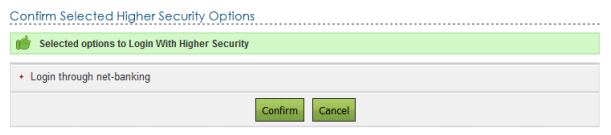
Success message is displayed on the screen.

Next time when you log in to income tax e-filing website using your PAN and password, you will be redirected to e-Filing Login Through NetBanking page where you need to select your bank, from the list of the banks provided, and login to the bank.
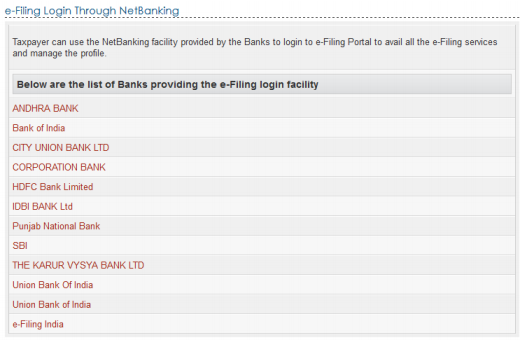
After logging to NetBanking account, click on the link Login to the IT e-Filing account. You will be now be logged to your to e-Filing website .
How to remove the option of logging onto e-filing website using Login through net-banking
As mentioned earlier You can deselect High Security Option any time.Go to Profile Settings -> E-Filing Vault >Higher Security and unselect the option,i.e remove the tick in the box, Login through NetBanking and click Proceed button.
You will see a confirmation page. Click on Disable button. Success message is displayed on the screen.
Using eFiling Vault Option of Logging in to Income Tax E-filing website using Digital Signature
If you choose Login through net-banking, along with e-Filing User ID and Password, you will be required to login through Net Banking. This ensures additional security to your e-Filing account.
You need to select the option, Login using DSC ,(click on checkbox next to Login using DSC,a tick will appear)
Please note the same form takes input for Lock Reset Password Option which has Reset Password through net-banking as the default option. So change it if you want to use your digital signature to reset Password.
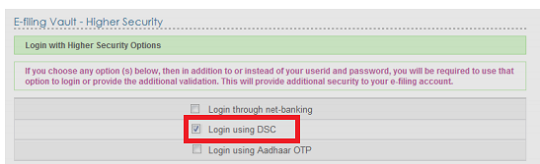
Once you select the option(click on checkbox next to Login using DSC,a tick will appear), confirmation message appears. Click button OK and click the Proceed button.
You will see a confirmation page. Click on Confirm button. Success message is displayed.
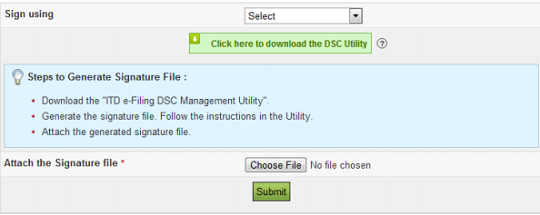
Next time when you log in to income tax e-filing website using your PAN and password, you will be redirected to Secured Login Option page where you need to select the either New or Registered DSC, and upload the signature file generated using Digital Signature Management utility. and Click Submit.
How to remove the option of logging onto e-filing website using Login using Digital Signature
As mentioned earlier You can deselect High Security Option any time.Go to Profile Settings -> E-Filing Vault >Higher Security and unselect the option,i.e remove the tick in the box, Login using and click Proceed button.
You will see a confirmation page. Click on Disable button. Success message is displayed on the screen.
Using eFiling Vault Option of Logging in to Income Tax E-filing website using Aadhar One time password(OTP)
If you choose Login Using Aadhaar OTP, then along with e-Filing User ID and Password, along with e-Filing User ID and Password, you will be required to login using Aadhaar OTP generated. If you have linked Aadhaar to the PAN a request is made to the Aadhaar Web service, OTP is generated and sent to the Mobile Number registered with UIDAI. This ensures additional security to your e-Filing account
You need to select the option, Login using Aadhar OTP ,(click on checkbox next to Login using Aadhar OTP,a tick will appear)
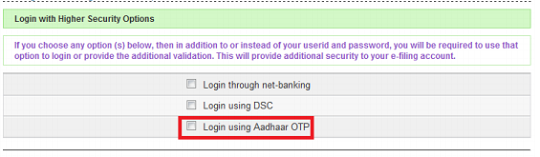
Once you select the option(click on checkbox next to Login using Aadhar OTP,a tick will appear), confirmation message appears. Click Generate Aadhaar OTP button.
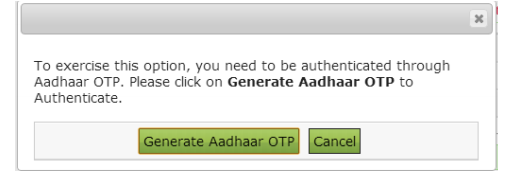
Aadhaar OTP will be sent to the Mobile Number registered with Aadhaar.
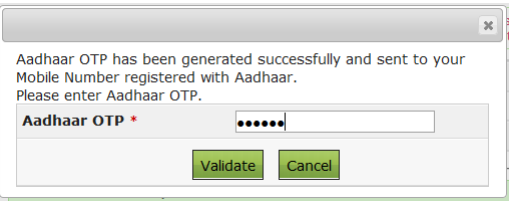
Enter the Aadhaar OTP and click Validate.
Success message is displayed on the screen. Click OK button and click the Proceed button.
Please note the same form takes input for Lock Reset Password Option which has Reset Password through net-banking as the default option. So change it if you want to use Aadhar OTP to reset Password.
You will see a confirmation page. Click on Confirm button. Success message is displayed on the screen.
Next time when you logs in, you will redirected to Aadhaar OTP Login page where you need to generate Aadhaar OTP. Click Generate Aadhaar OTP button.

Once Aadhar OTP is validated you are logged in to Income tax e filing website
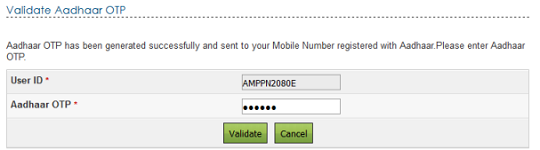

- Validate Aadhar OTP to login to income tax efiling website
Lock Reset Password Options in Income Tax Efiling
If you forget your password, then the you will be required to use the option selected using this process to reset password. The existing options of e-Filing OTP and Secret Question will be disabled.
You can change the password anytime through Profile Settings -> Reset Password.
Reset Password through net-banking
This is a default option available. At any time you can reset your password using NetBanking option.
- In the Login Page, click Forgot Password? link.
- You will be redirected to a Reset Password page. Enter the User ID and Captcha Code and click Continue.
- Click on e-Filing Login Through NetBanking link.
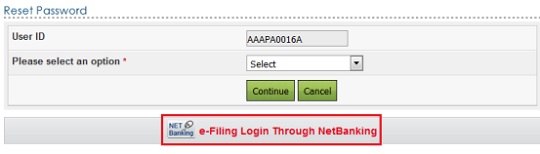
- You must select the bank from the list of the banks provided
- After login to NetBanking account, click on the link Login to the IT e-Filing account
- You will be logged in to e-Filing website.
Reset Password using Digital Signature
- Select the option Using DSC and click Continue. You are redirected to a page where you can select the type of DSC and upload the signature file generated using DSC Management Utility
- Click on Validate button. You will be taken to a page where you can Change the Password.
- Enter the New Password and re-enter the Password and click Submit button. Success message is displayed on the screen.
Reset Password using Aadhar OTP
User can reset his password only using Aadhaar OTP. Select the option Using Aadhaar OTP and click Continue. Note that e-Filing Login through Net Banking is available.
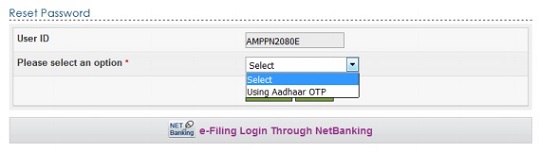
- Verify the User ID and Aadhaar Number and click Generate Aadhaar OTP button.
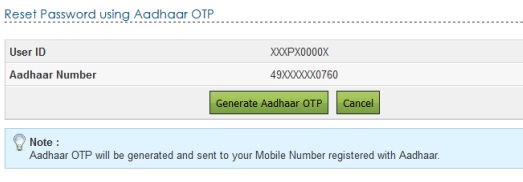
- Aadhaar OTP is successfully generated and will be sent to the Mobile Number registered with Aadhaar.
- Enter the Aadhaar OTP and click Validate
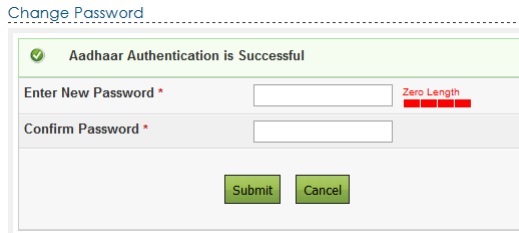
- Enter the New Password and re-enter the Password and click Submit button. Success message is displayed on the screen.
Related Articles
- Registering on Income Tax efiling Website
- E-Filing of Income Tax Return
- Filling ITR-1 : Bank Details, Exempt Income, TDS Details
- E-filing : Excel File of Income Tax Return
- How to file Income Tax Return Online : Incometaxefiling,CA,efiling Websites
- E-verification of Income Tax Returns and Generating EVC through Aadhaar, Net Banking
[poll id=”84″]
Once you go in for E-filing Vault facility, login to Income Tax website will require the additional check of One time password(OTP) using Aadhaar or login using net banking or login using Digital Signature.So basically you have to provide two different login information . The dual-factor authorisation ensures higher degree of security compared with the simple user ID and password. By using this facility, taxpayers can prevent anyone from logging in even if in the past they shared the user id and password. What do you think of e-filing higher secuirty? Will you go for it? If yes which one using Aadhaar or login using net banking or login using Digital Signature
