Who will get your EPF money, if God forbid, something happens to you? Under EPF nomination, every employee has to give the details of the nominee or nominees who will receive the EPF money in case of employee’s death. If there are no nomination details, either EPF fund remains unclaimed or creates issues between family members of the deceased member. So to avoid any such occurrence what you have to ensure is that you have given all the required nominee details of your EPF to your company or EPFO. We shall look into detail What is EPF nomination? What are the rules of EPF Nomination? What is E-Nomination service of the EPFO department, how can one update their nominee details online or offline?
A nomination is a process of appointing a person to take care of your assets in the event of your death. For all investments except company bonds and equity or stocks, the nomination does not provide ownership of your assets. The nominee will only be the custodian of the asset until it is given to its beneficiaries.
Our article Nomination, Will, Operation of Joint Account talks about Nomination,Will in detail.
Table of Contents
EPF Nomination Rules
There should be a nominee for every EPF account so that the funds can be transferred in case of the member’s premature death. On the death of a member, the fund would be paid to the nominee(s). The payment would be by stated proportion (if any). If there is no nomination, the fund would be equally distributed among the family member. The major son and married daughter are not considered for such distribution.
When a person joins a job, the employer asks the employee to fill the EPF nomination Form 2(Revised) to declare nominee details for EPF to the employer. Along with Form 2(Revised) employee has to fill in EPF Form 11 which is a self-declaration by the new employee about his status whether he is a member or not of EPF / EPS in earlier employments and opt out of EPF. Usually, the Human Resources(HR) department of the company provides the various forms.
EPF Form 11 on Joining a New Job: Auto transfer of EPF account explains in detail EPF Form 11.
An Employee can change nomination at any time and any number of times. The fresh nomination made by the EPF member will make the earlier nomination null and void. Earlier nomination could be changed only by resubmitting the Form 2 again to EPFO through your employer.
EPF subscriber submitted FORM 2 for the nomination which employer after authorization would send to Regional EPF office. The entire process was manual and time-consuming. Now EPFO has introduced E-nomination facility which is faster and it also removes intervention of employer for a change in nomination. If your Martial Status is not provided then you will not be allowed to do Enomintaion. We have discussed E-Nomination in detail later in the article.
Whom Can An Employee Nominate in EPF Scheme?
- Married male members can nominate His Wife, Children, dependent parents & his deceased son’s widow & children.
- Married female member can nominate Her Husband, Children, dependent parents, her husband’s dependent parents & her deceased son’s widow & children.
- An unmarried member or members with no family can nominate any person or institution related to him or not.
EPF Nomination rules
- An EPF member can declare more than one nominee with a specified percentage in which the EPF fund will be divided on the death of the EPF member.
- Using the online facility, the nomination can be changed as per the member’s wish.
- The nominee from outside of the family would be invalid.
- As per the EPF act, EPM member cannot nominate his/her BROTHER as a nominee.
- Any nomination made before the marriage would be invalid after the wedding. After the marriage, the member should give a new nomination.
- If the member doesn’t have a family at the time of nomination, he or she can nominate anyone to their EPF account. But once, the member acquires the family the nomination must be in the name of family member.
- While nominating a minor, the guardian of the minor should be the family member. If there is no major family member, the guardian can be anyone.
- In case of more than one nominee, if one of the nominees dies before you then you have to change your nomination details i.e name and percentage of nomination else your EPF nomination will go null. Which means the money of your EPF will not be given to other nominees in case of your death.
How does an Employee Declare Nominee Details for EPF
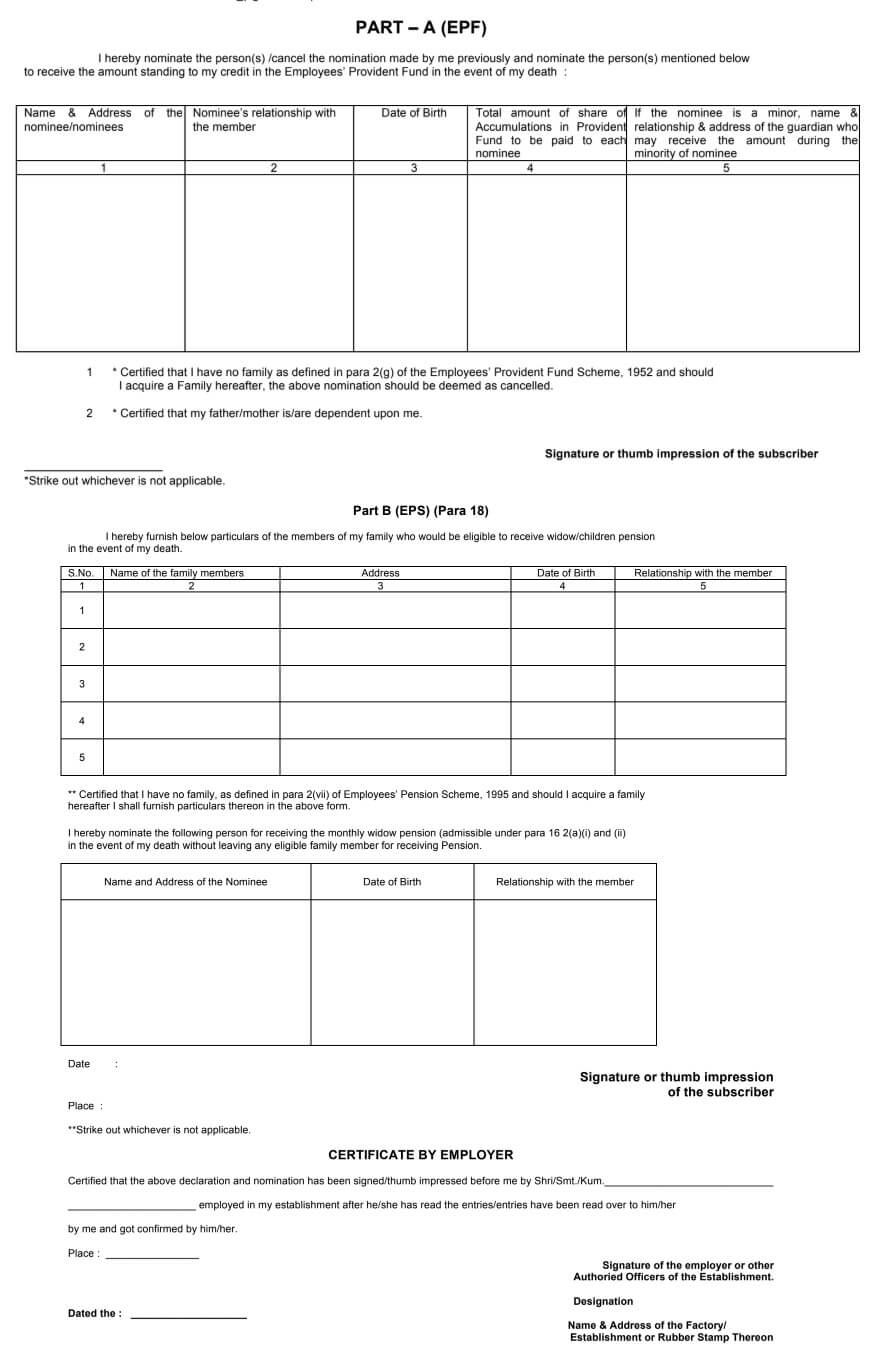
Form No 2 Nomination Form is the common Nomination Form For PF and Pension Scheme, Part A is for EPF and part B is for nomination wife and children who will receive pension after the death of the employee.
How Can an Employee Check his EPF Nominee Details?
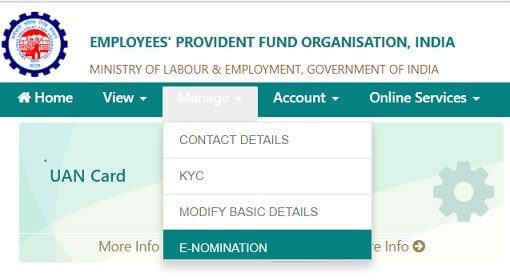
An employee can check his current Nominee Details, his Nomination history by logging in to UAN and Checking Manage->e-Nomination.
Steps to Change EPF Nomination Online, Enomination
EPF subscriber submitted FORM 2 for the nomination which employer after authorization would send to Regional EPF office. The entire process was manual and time-consuming. Now EPFO has introduced E-nomination facility which is faster and it also removes intervention of employer for a change in nomination.
Steps through which an EPF nomination can be changed online:
- Log in to the UAN website, https://unifiedportal-mem.epfindia.gov.in/memberinterface/ ,using the UAN (Universal Account Number) and password.
- On the UAN dashboard, the facility to change details can be accessed under the Manage tab through e-Nomination
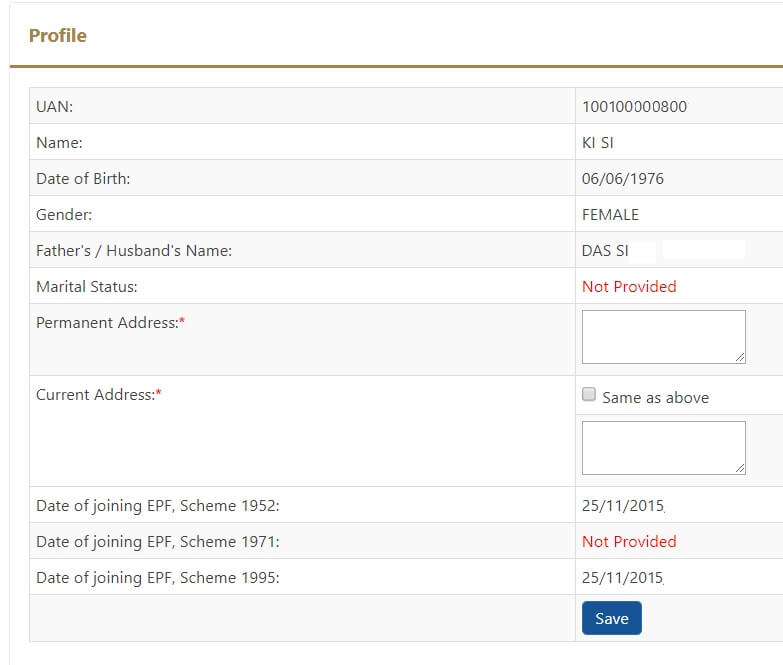
- You will find fields such as UAN, Member ID, Establishment ID, Name, Date of Birth, Father/ Spouse name, Relationship, Date of Joining, Gender, and Marital Status. These are already auto-populated from the database and cannot be edited. The only editable data is Permanent Address and Present Address. If your Martial Status is not provided then you will not be allowed to proceed further.
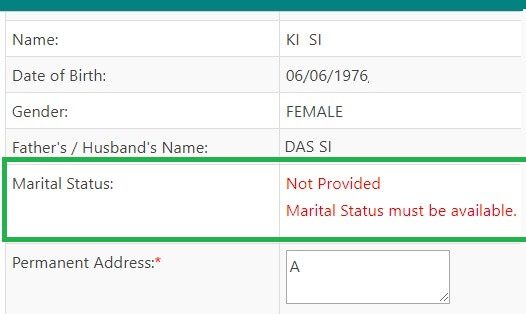
- If your Martial Status is not provided then you will not be allowed to proceed further. You will get an error message as shown in the image below. To correct this you have to approach the Employer who will update the details.
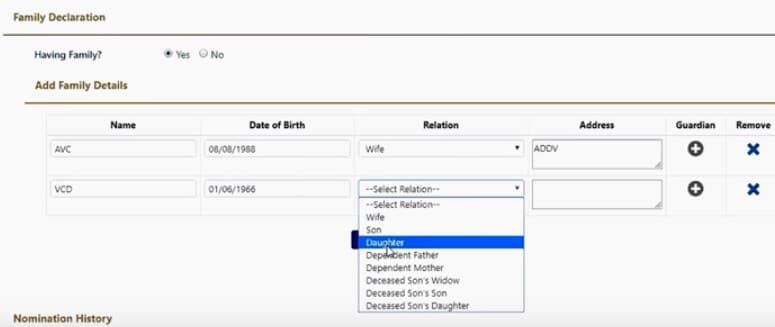
- if your Martial status is provided, On clicking Save, a screen having a section where family details can be edited will appear. Here you can enter the details, and assign the corpus along with the KYC. Once it is updated, the details will be populated on the EPF/EDLI section.
- After filling all the needed details, click on ‘Submit’ to save the nomination declaration. The printout of the updated form can be submitted to the employer for records.
Video on How to Update EPF Nominee Online and Offline
In this video, you will learn how to update PF nominee details by filling EPF nomination form 2 and also how to update EPF online.
Please verify your nominee details and update the Nominees if you want to change them. Do let us know If you are able to nominate successfully or you come across some problem.
Related Articles:
- FAQ on UAN number and Change of Job
- EPF Form 11 on Joining a New Job: Auto transfer of EPF account
- How to Transfer EPF Online on changing jobs
- Nomination, Will, Operation of Joint Account


20 responses to “EPF Nomination, e-Nomination to Update Nominee Details for EPF”
Joint account of Nominee is acceptable for E nomination on EPFO portal or not??
Pradhan Mantri Jan Dhan Bank Account is acceptable for E nomination on EPFO portal.
is Bank Account of nominee compulsory for e nomination
Error 1019; error while registering Esign…. unable file enamination
Hi ,
My Query is i am trying to update nomination UAN portal, but below details are asked and i do not know from where and what information i need to give for 1971 and 1995 scheme.
can anyone advice.
Date of joining EPF, Scheme 1952: 01/12/2010
Date of joining EPF, Scheme 1971: Not Provided
Date of joining EPF, Scheme 1995: Not Provided
Date of Joining of EPF Scheme, 1995 must be available
Thanks
Mahesh
I am facing same issue.
Any resolution for same ?
I am married female and having dispute with my husband. I am staying with my parents from one year . I have a baby boy of 2year. I want to keep my parents or son other than my husband nominee of PF account. can I still chose my parents or my son other than my husband else only in nomination?If not, is there any other way to do the same?
Is pan required for nominee if he or she not minor ?
My problem is, in E nomination column only EPF details are saved and EPS details are not saved. it contnously shows error. what is the reason? can any body help me?
Only spouse or children can be nominated for EPS. Not sure what unmarried individuals can update. If you are married, update spouse or child’s name.
How to nominate unmarried personal with depends mother or father
I have a query.Though I am married,I want to keep my parents or someone else other than my wife /children as nominee of PF account.If I change my marital status to ” Married”,can I still chose my parents/ someone else other than my wife /children else only in e-nomination?If not, is there any other way to do the same?
If you nominated someone before marriage, then post marriage you have to update your spouse as a nominee. If you do not update then the nominations made before the marriage will be considered invalid. It is necessary to file new nominations, post marriage.
An EPF member can declare more than one nominee with a specified percentage in which the EPF fund will be divided on the death of the EPF member.
Married male members can nominate His Wife, Children, dependent parents & his deceased son’s widow & children.
An Employee can change nomination at any time and any number of times. The fresh nomination made by the EPF member will make the earlier nomination null and void. Earlier nomination could be changed only by resubmitting the Form 2 again to EPFO through your employer.
Remember nomination only indicates the person who is authorized to receive the amount and authority gets a valid discharge of its liability. The amount, however, can be claimed by the heirs of the assured in accordance with the law of succession.
Thanks for the reply.I wish not to give my hard earned money to my wife because of personal issues.While I am doing the e-nomination,I need to put my marital status as ” Married”.My concern is if I choose my status as “married”,will I be able to pick other nominees other than wife in the drop down choose option??
Hi actually my father not available
My father name Nirmal Bora
Last stage it is showing nomination pending. The esign when clicked message is coming as esign updation under progress
Are you seeing it as employee or employer?
As an employee
Same problem plz solved the problem
Father name update kar na hai
aap employee hai yaa employer… ??? agar aap employee hai toh aap ke portal se nahi ho paayega… employer hi update kr sakta …