An employee can transfer his provident fund Using EPFO’s online facility from the previous employer to a new employer. You can do it from the EPFO UAN Portal using Online Services->One Member One EPF (Transfer Request). To use the facility one must have their KYC approved in the UAN and Employer should have a digital signature. The Employee has to get his claim attested by the current or the previous employer. This article talks about the How to transfer EPF online on changing jobs in detail with images.
Table of Contents
Overview of the steps to transfer EPF online
One has to transfer old PF account to the new account. Only then will you be able to withdraw from both the accounts online. Linking of PF account with UAN is not sufficient. Our article Why should one transfer old EPF account to the new employer? explains it in detail.
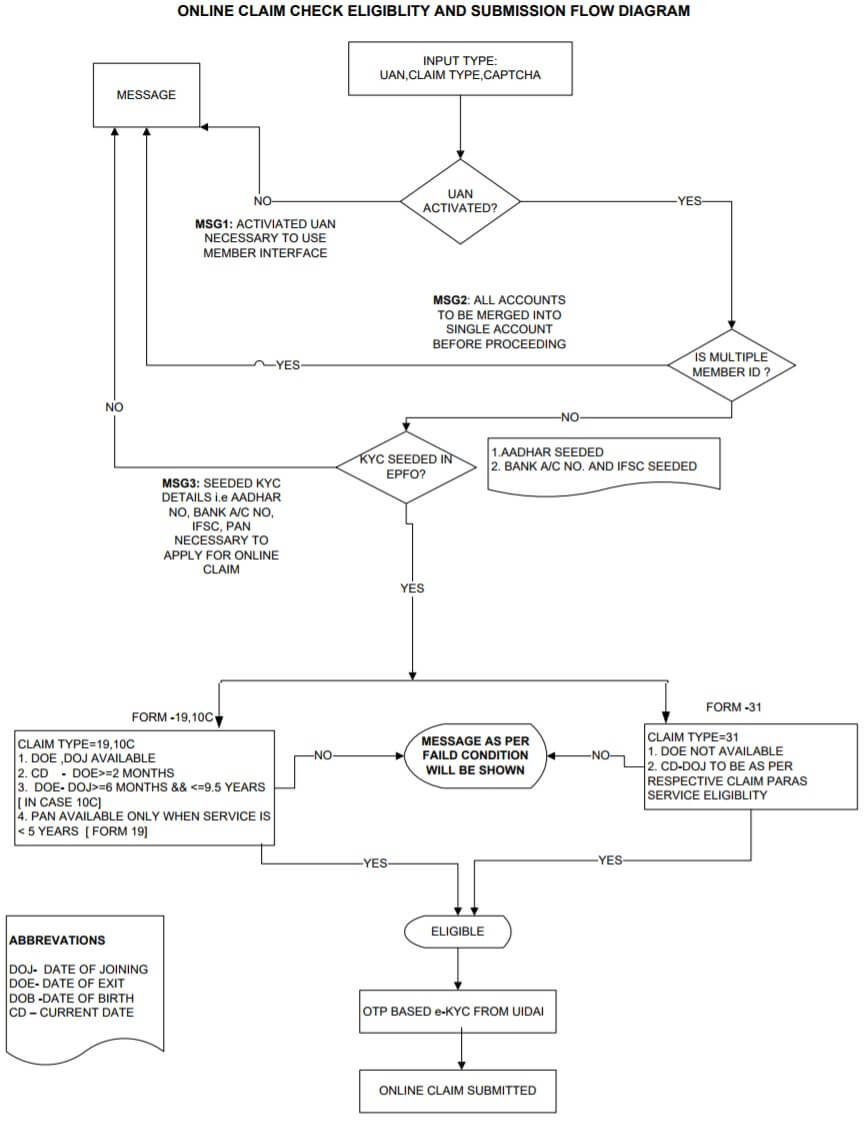
To use the facility employee must have activated their UAN and should have linked their Aadhaar, PAN, bank account details with IFSC code and verified PAN and Aadhaar.
Govt has said that transfer would be done automatically if you have EPF account with unexempted EPFO and you submit your UAN to new employer but so far we have not heard of automatic transfer. If you come to know about it please do share with us.
- Go to the EPFO members’ portal and log in using your UAN and password.
- Verify that all your details are populated in the UAN portal. No missing or incorrect information.
- Verify that your KYC is approved.
- Please check that your Bank Account Number, IFSC code is correct.
- Click on Online Services->One Member One EPF (Transfer Request).
- The Employee has to get his claim attested by either the current or the previous employer if the previous employer is not exempted trust. But if the previous employer is exempted trust then you need to submit the claim to the previous employer only.
- A PIN will be generated and sent to the registered mobile number.
- Submit the claim form to the selected employer.
- The employer should approve the request.
- You can check the status of your EPF transfer claim by clicking on Online Services->Track Claim Status. You will also receive regular updates.
- After submitting the form within 2-3 weeks your EPF account should be transferred.
- You can check your claim status by logging to UAN site and clicking on Online Services->Track Claim Status. You will also receive regular updates.
- You can also check your claim status by going to EPF website epfindia.gov.in->Our services->For Employee. Selecting Know Your Claim Status. Enter the UAN and the Captcha.
- After the successful claim, UAN passbook of the old and new employer will reflect the transfer as shown here.
- There is no information about EPS transfer. Your EPS pension is dependant on the number of years you contributed to EPS. So View->Service Details on UAN site is sufficient but you can get Annexure K for your own record by raising EPF grievance.
On 20 Sep 2017, EPFO has introduced a new composite form called Form 11 that replaced Form 13. At the time of joining a new employer, an employee can give details of their previous EPF account in the new composite form (Form 11). Once the previous EPF account details are provided in Form 11, the funds will be automatically transferred by the EPFO to new EPF account. Our article EPF Form 11 on Joining a New Job explains it in detail.
From 25 Jul 2017 UAN interface replaces the OTCP facility which was launched in 2013 to transfer the PF.
Check if you are eligible for EPF Transfer
The images below show EPFO transfer online form and claim eligibility check and submission.
The EPFO online claim and Eligibility Form
Step by Step process to transfer EPF online
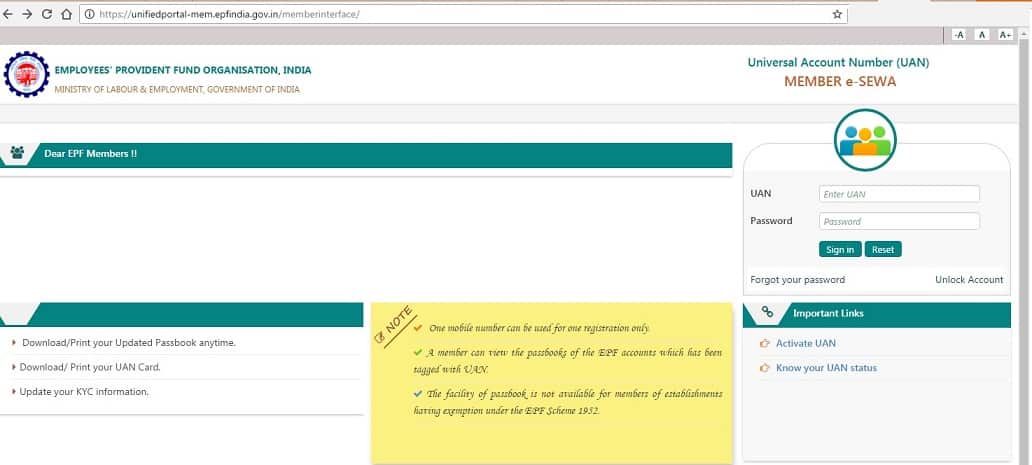
Go to the EPFO members’ portal and log in using your UAN and password.
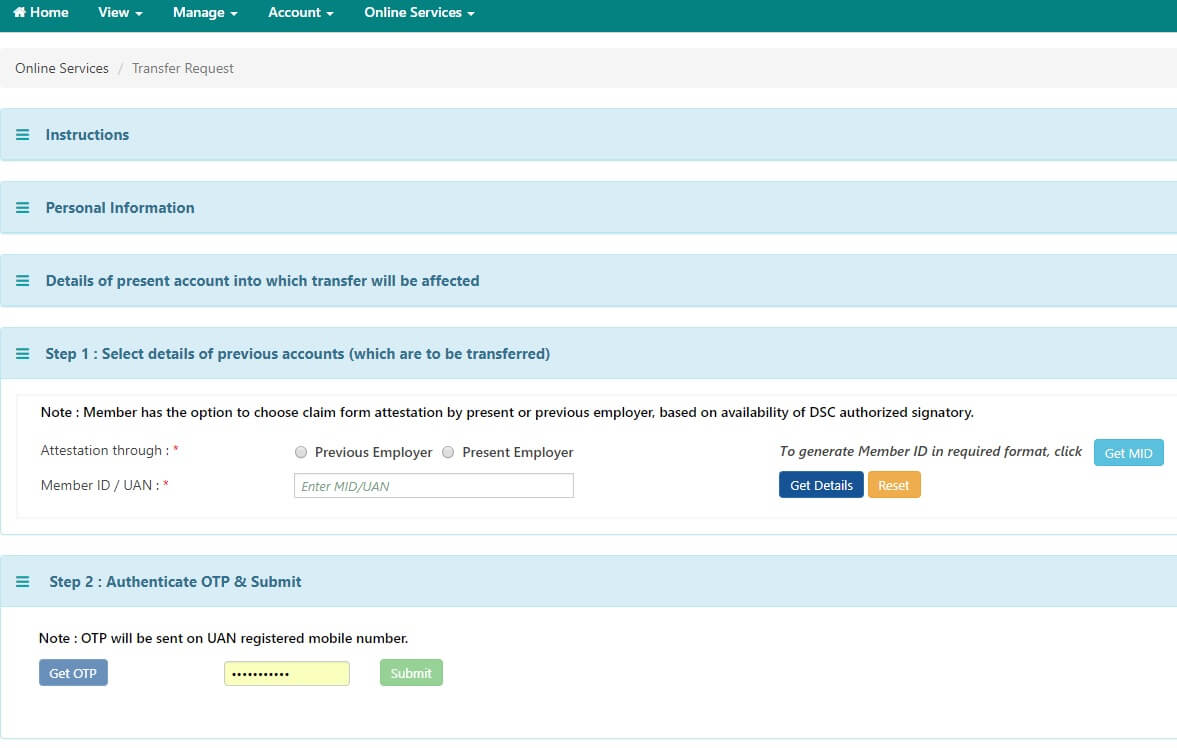
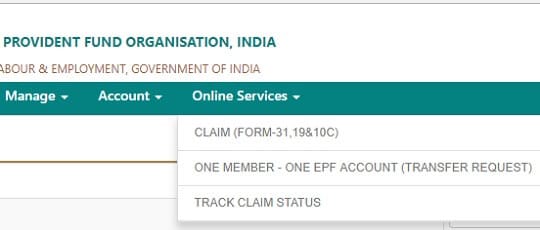
Go to the Online Services’ tab and select ‘Transfer Request’ to generate an online transfer request.
Click on Online Services->One Member-One EPF account (Transfer Request).
Read the instructions properly
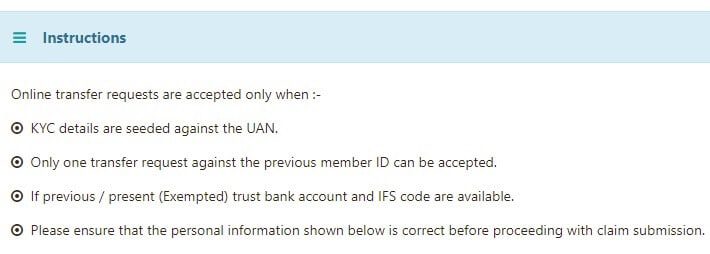
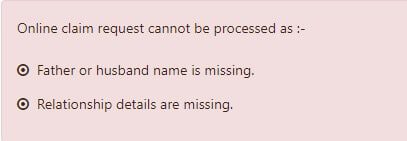
Scroll down to the bottom of the page to see if there are some problems in the processing of Online Claim request. For example in one of our reader case the Father/Husband and relationship were missing.
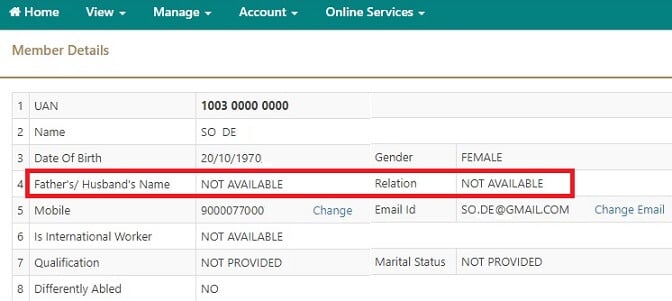
To check the details, he clicked on View->Profile and saw the information was missing, as shown in the image below. He then requested his employer to update the details.
If you have no such errors then you can check that the details of PF account which will be affected.
You can then select details of the account which needs to be transferred. Choose the Member Id or PF account number. And through which employer will you get the EPF claim form attested.

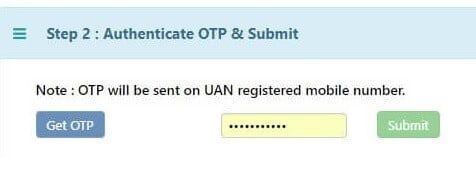
Then click on Get OTP which will be sent to the mobile number registered with UAN. Enter OTP and select Submit.
You will get the message saying that your claim is submitted and you can also Track Status. Click on the printable form and submit it to the employer you have chosen.

The employer will also get an online notification about the EPF transfer request.
After submitting the Transfer Claim
Once you submit the form, after verification of your employment details, the employer can digitally forward the claim to the EPFO office, which will process the claim.
It takes 1-4 weeks your EPF account to be transferred.
You can check the status of your EPF transfer claim by clicking on Online Services->Track Claim Status. You will also receive regular updates.
You can also check your claim status by going to EPF website epfindia.gov.in->Our services->For Employee
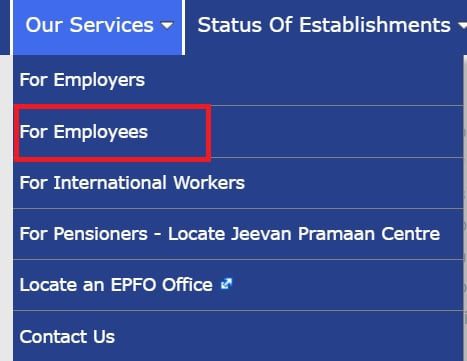
selecting Know Your Claim Status.
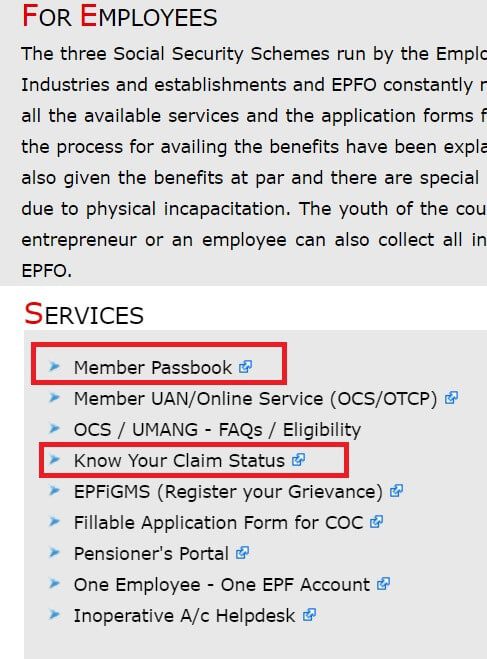
Enter the UAN and the Captcha.
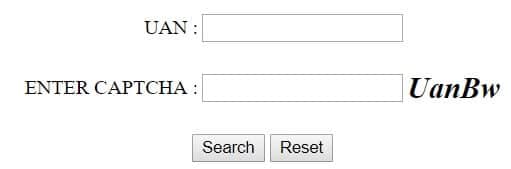
The successful claim status will be similar to the image shown below
UAN passbook after the transfer
When you log in to see EPF passbook at EPF website epfindia.gov.in->Our services->For Employee and selecting Member Passbook.
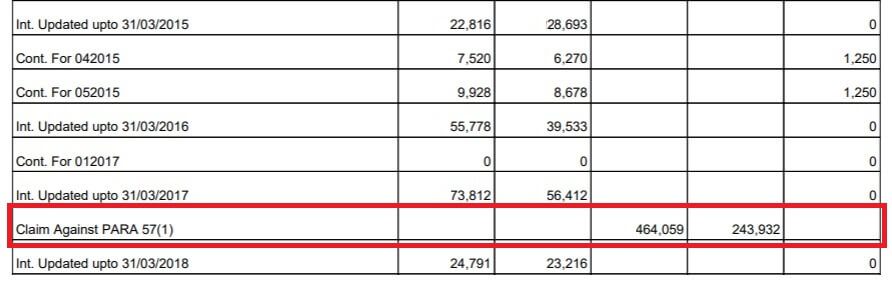
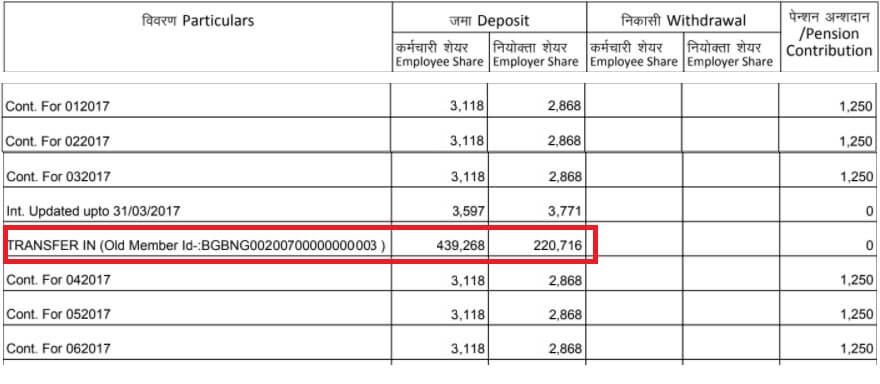
You will see passbook of old and new employers as shown in image below.
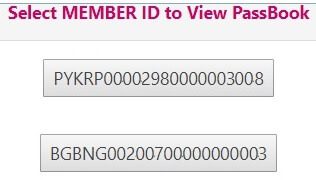
After the transfer, the old passbook will show the transfer out
And the new passbook will show the transfer in
What happens to EPS during Transfer?
I had transferred my EPF account from my old organization to the new company. While EPF transfer was reflected in UAN passbook there was no information about EPS transfer. In my UAN passbook of both the old account and new account, Pension contribution was 0. I asked UAN helpdesk(which was functional then but is non-functional since Nov 2017) and got the following response
“WHILE TRANSFERRING PF FROM ONE ESTABLISHMENT TO ANOTHER, THE SERVICE DETAILS INFORMATION (VIZ LENGTH OF SERVICE, NON-CONTRIBUTORY PERIOD, LAST WAGES DRAWN ETC) ARE FURNISHED TO THE RECEIVING PF OFFICE IN ANNEXURE-K WHICH WILL BE USED TO CALCULATE PENSION BENEFITS. AMOUNT IN PENSION FUND IS NOT REQ”.
Your EPS pension is dependant on the number of years you contributed to EPS. So View->Service Details on UAN site is sufficient but you can get Annexure K for your own record by raising EPF grievance. Annexure-K of EPF is a document which contains details of EPF account. Now one can get the Annexure-K by downloading from the UAN website, especially from a company with EPF trust (the exempted) to company which is managed by Regional EPF i.e unexempted. Else you can raise EPF complaint
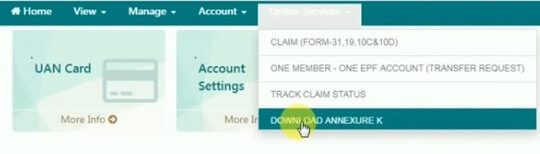
Download Annexure-K from UAN site
Login to UAN website, EPFO members’ portal, with your UAN and password.
Select Download Annexure-K from Online Services.
Raise EPF Complaint
- Visit http://epfigms.gov.in/
- Click on the Register Grievance to register EPF complaints. To lodge the complaint you must have your EPF UAN number. This has been made mandatory from 1 January 2016.
Our article How to register EPF complaint at EPF Grievance website online explains the process in detail.
Our article What happens to EPS when you transfer your old EPF to a new employer explains it in detail.
Related Articles:

33 responses to “How to Transfer EPF Online on changing jobs”
Hi, I’m getting the rejected message as “claim rejected: 5 years contribution is required”. I have more than 5 years of service. I have made claim for house construction.
I have also transferred old EPF from previous company to the last company.
I don’t know why it is still being rejected.
Can you please help me in this case?
Please raise the complaint with EPFO as explained in the article
http://bemoneyaware.com/epf-grievance-complaint-online/
Hi,
Actually am here for the help.
I have took my EPF fully from three companies which i have worked only for 1.5 months (the last company).
Now am unable to take my EPS by applying form 10c. i got an error ” Claim Rejected NOT ELIGIBLE INSUFFICIENT SERVICE FPF SERVICE LESS THAN 6 MONTHS HENCE CLAIM REJECTED “. but here there is my 4 and a half years pension Contribution .. please help me to take it
So you worked in the last company for just 1.5 months. So you cannot withdraw EPS as you have worked for less than 6 months.
If you have not transferred your old EPF to the last company you would not be able to withdraw from the old company.
Hi
I want to transfer my pf balance from previous employer (epfo), to current which is trust
I knew the process but on one of page…it asks for of account number (trust)…what should be furnished here, trust establishment pf number or employee of number under trust
Best to contact your employer.
Hi,
I am having an error, “Online claim request cannot be processed as :- Present employer has not made payment in your PF account.”, when i try to perform the transfer request. please let me know what it means and also i left my previous employer (TRUST) on 21st August 2015 and not yet transferred my old PF amount to new PF account. will it be a problem or still i can transfer or withdraw?
Thanks in advance!
Hi
I WANT TO TRANSFER MY PF FROM TRUST to TRUST, is it possible to transfer online?
Depends on the companies involved.
In companies like Infosys, TCS yes.
It is best if you speak to your new employer and old employer.
Not able to raise a request as its throwing an error.
1. I selected “Attestation through the previous employer” and added first UAN details and got this error. Error: No previous employment details found against this UAN
2. I tried ‘Get details’ and got this error. Error: Details of the previous account are different than the present account. Hence, Claim request cannot be processed.
Kindly help.
Do you have 2 UAN?
To match 2 UAN your name, date of birth, father’s name etc should match.
Please check the details of both UAN.
Hi,
I’ve two UANs 1 from Previous employer and 1 from current employer.
I am trying to transfer previous PF balance to current one through online service one Member One EPF account. However, it doesn’t work.
Kindly Help
Dear friend , it should mention Date of Joining and Date of Exit on your UAN account IN View Service history and also update your bank account number and IFSC code in manage link after u can transfer the amount to current employee
if date of exist not provided by previous employer and i unable to contact him what can i do? please give any suggestion
You can raise a complaint as explained in the article How to register EPF complaint at EPF Grievance website online
You can submit the application offline
We are managing an unexempted private epf trust, can you guide us on how to provide linked benefits to our employees and any legal obligations.
I raised transfer claim from Employer 1 to Employer 2 through UAN portal and Attestation through Employer 1. Claim Status is Submitted. I can see last column mentioned as Printable Form 13. It was also approved by employer 1 but still showing 2 uan account .how long it takes to become 1 uan or anything i have to do.
I raised transfer claim from Employer 1 to Employer 2 through UAN portal and Attestation through Employer 1. Claim Status is Submitted. I can see last column mentioned as Printable Form 13. Do i need to physically sign it and send it to Employer 1. Employer 1 is in Kerala and i am now working in Telangana. If yes, then how do i physically submit..via post, normal or registered post or courier?
good info.
Dear Basunivesh,
I have submitted the online transfer request. It got rejected with below remarks.
Claim-Form-13 (Transfer Out)(Transfer (Unexempted to Unexempted in other region or to Exempted Establishments)) Claim id-PBCHDxxxxxxxxxxxx Member id-PBCHDxxxxxxxxxxxxxxx has been rejected due to :- FROM 13 INCOPMPLET/OK
It picks up the details automatically and all my details are correct on the UAN portal, Still it got rejected. Don’t know why its rejected because of incomplete form 13.Can you please help me in this case
Hi Kulwinder,
I got the same issue (remarks). Is it resolved now. Did you get your PF Amount?
Regards,
Setu.
Is it being transferred to Unexempted or Exempted organization?
Is it being transferred to Unexempted or Exempted organization?
I have withdrawn my EPF from my previous organisation, where I used to work for about 11 years. I got my EPF money through NEFT to my bank account. However I never recieved any details about my EPS so far. The time I withdrawn the EPF Was 2012. What I need to do for EPS please. Guide/advice me
Raise EPF grievance and find details of EPS.
How many years did you work?
Our article explains how to raise complaint at EPFO.
Hi !
I want to transfer my EPF from an exempted organisation to non-exempted organisation.
Is online transfer is possible ?
You can initiate the transfer online
but as the non-exempted organization has no details about the exempted organization you have to submit the form to old employer only.
Let us know if you face the problem
9175423651 mera pf ka pissa nikalna hai
How to transfer pF to my Account given an explanation and give contact number of head qutores
Hi ,
what does “rejected from field office” means . I tried to transfer my PF from non exempted org to exempted org.
1 ****** Online Claim PY******** PY********** Rejected by field office Previous Employer (** ****** ******)
Without knowing the details fully
it means the Regional EPFO has rejected your transfer.
You can raise an EPFO grievance. Our article How to register EPF complaint at EPF Grievance website online explains it in detail.
HI,
I WANT TO TRANSFER MY PF FROM non exempted org to exempted org.
PF Account No.(Trust) : WHAT I HAVE TO WRITE MY PF TRUST ACCOUNT NO. OR TRUST COMPANY PF ACCOUNT NO.
KINDLY HELP
Submit the letter to your new organization they will do the needful.