Aadhaar is becoming an important document to have. It is needed almost everywhere. Our article What is Aadhaar, How to enrol,Check Aadhaar status,Download e Aadhaar talked about how to get Aadhaar. But once you get Aadhaar, what if you change your address, then you need to update your Aadhaar card. This article talks about what data can be updated in Aadhaar and how to Update or Correct Details in Aadhaar – online or post?
Overview of Aadhaar
Aadhaar ,which means foundation, is a unique 12-digit Identification number issued to individuals for the purpose of establishing unique identification of every single person. It is issued by the Unique Identification Authority of India (UIDAI) on behalf of the Government of India
- It is a random number generated, devoid of any classification based on caste, creed, religion and geography
- It is easily verifiable in an online, cost-effective way and Unique and robust enough to eliminate the large number of duplicate and fake identities in government and private databases
- Aadhaar is required as the single point for all your credentials and entitlements. This number will serve as a proof of identity and address, anywhere in India. For example, if you want to get a new PAN card or change your telephone connection, enter your unique ID for authentication and also as proof of identity and address. For Know Your Customer credentials too, Aadhaar authentication is enough. To know which organizations accept Aadhaar is available at Aadhaar’s website What is Aadhar.
What data can one update in Aadhaar?
You can update or correct the following data either by submitting your request Online or sending request through Post.
- Name
- Gender
- Date of Birth
- Address
- Mobile Number
Some facts about Aadhaar updation
- UIDAI has launched Aadhaar Self Service Update Portal,https://ssup.uidai.gov.in/web/guest/ssup-home, to change or update the details of the people online. If you plan to use Online mode it is mandatory to provide mobile number.
- Children on attaining 15 year of age need to update biometric information.
- For other updates or correction, one has to visit Aadhaar Enrollment or Update Centre. You can search Aadhaar Enrollment Centre on uidai.gov.in webpage Locate Aadhaar Enrollment center.
- Depending on the field to be updated, one has attach self attested supporting documents as per the Valid Documents List.
- Maximum permissible update request for each resident is limited to four. Repeated efforts to change/update the same field will attract investigations for establishing authenticity of the request.
- Submission of information for update does not guarantee update of Aadhaar data. The information submitted is subject to verification and validation. Furnishing of incorrect information/suppression of information would lead to rejection of application and would attract penal provisions under the prevailing laws.
- Documents required during Update/Correction
- Name Correction/Update – Requires Proof of Identity (PoI) listed in Supported Proof of Identity(PoI) Documents Containing Name and Photo for Name Corrections/Update
- Date of Birth Correction – Requires Date of Birth (DoB) listed in Supported Proof of Date of Birth (DoB) Documents
- Address Corrections/Change – Requires Proof of Address (PoA) listed in Supported Proof of Address (PoA) Documents Containing Name and Address
- One has attach self attested supporting documents as per the Valid Documents List.
- Take a photocopy of the document,
- put signature on the photocopy,
- scan it, and
- upload it.
Why is Mobile Number necessary for online updation of Aadhaar Details?
If you plan to use Online mode it is mandatory to provide mobile number as it may be used for Verification by calling the Applicant. Status of application will be intimated to the resident by sending an sms on this mobile number.
If you have registered mobile number with Aadhaar (provided at the time of enrolment or updated subsequently), enter your Aadhaar Number to get an OTP (One Time Pin) at that mobile. If you have not registered your mobile with Aadhaar or you have lost/do not possess anymore, you will have to either visit nearest Update Centre or send your Update request through Post.
Table of Contents
How to Update Aadhaar Details Online
It is a 4 Step process at https://ssup.uidai.gov.in/web/guest/ssup-home ,an overview of which is given below. This is discussed in detail later in the article here
- Step 1: Login with Aadhaar
- Step 2: Select field for update
- Step 3: Fill new data for update
- Step 4: Upload Documents & Submit
How to Update Aadhaar Details through Post
Resident can update or correct his/her Aadhaar Data by sending the request form by Post. You can download Aadhaar Data Update/Correction Form For Request Through Post
- Fill in the complete Aadhaar Data Update/Correction Form and sign off.
- Depending on the field to be updated, attach self signed supporting documents as per the Valid Documents List . Mention your Aadhaar Number on all document copies.
- Review the data entered for correctness and completeness in English as well as local language.
- Seal the envelope properly, Mark the envelope as “Aadhaar Update/Correction” on top.
- Send the Form along with the supporting documents to one of the address given below .
- You will receive an intimation of update request receipt.
People may send across their update requests through post to one of the addresses mentioned below
| Address I | Address II |
| UIDAI Post Box No. 10, Chhindwara, Madhya Pradesh – 480001, India |
UIDAI Post Box No. 99, Banjara Hills, Hyderabad – 500034, India |
For more details please refer to Aadhaar’s Instructions for Sending Update Request Through Post and Update Data(FAQs)
Details on How to Update Aadhaar Details Online
UIDAI has launched Aadhaar Self Service Update Portal,https://ssup.uidai.gov.in/web/guest/ssup-home, to change or update the details of the people online. If you plan to use Online mode it is mandatory to provide mobile number must be registered during Aadhaar enrollment as you will receive an OTP (One time Password) to proceed with online updation procedure.
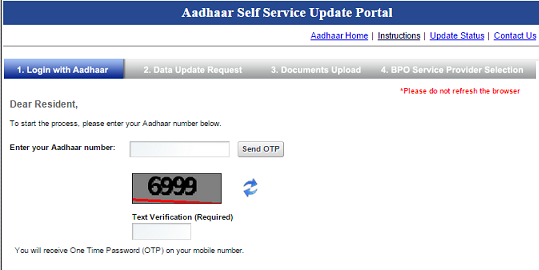
- Enter you Aadhaar Number in the text-box and enter the captcha text which is shown below and then click on Send OTP. After sometime you will receive OTP (One Time Password) on your registered mobile number, just enter the OTP which you have received on your mobile number and click on login.
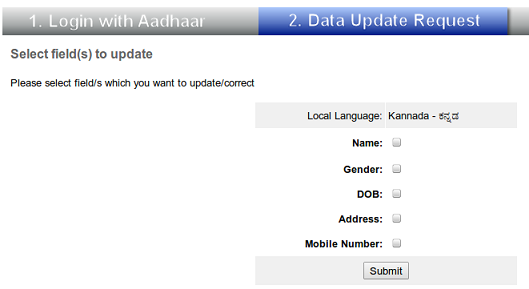
- Select the fields you want to be update /correct. You can select more than one field also and click Submit button.
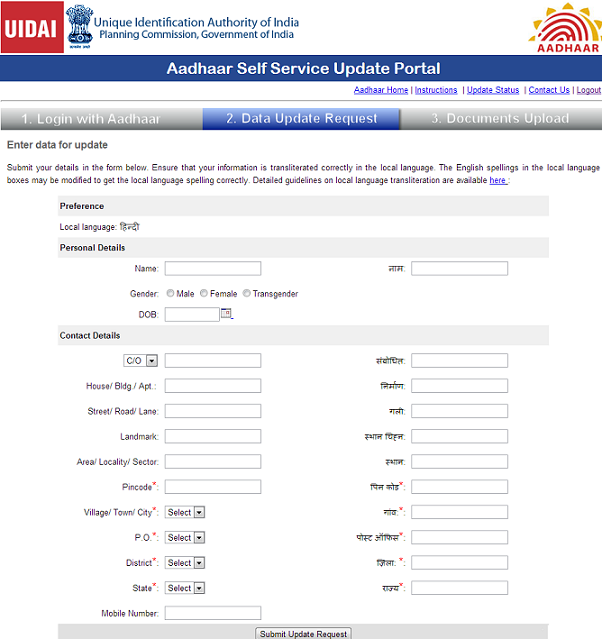
- Fill the fields with current details in English as well as Local Language. Local Language is one that was used at the time of your enrolment in Aadhaar and appears in your Aadhaar Letter. For example if you are in Bangalore your local language would be Kannada.
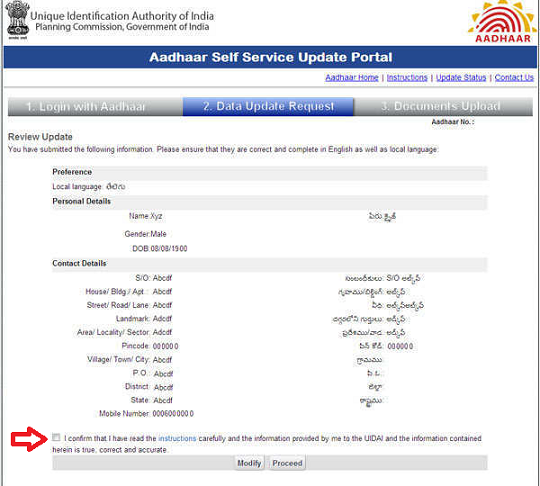
- Verify the data in English as well as local language. Note that Date of Birth will not appear in local language. Also any numeric figures will not be transliterated in local language. When you are satisfied that data entered is correct then check Confirm the details you entered is correct(shown be red arrow in image below) and click the Proceed.
- Upload the self-attested documents which support the modified data. Document can be in format of pdf or image (.jpg,.jpeg,.png) and maximum size should not exceed 2MB. For each document choose type of document (Passport/Certificate/PAN Card etc), Click on Choose file, a File browser will appear. Select the document you want to upload. After uploading the documents click on Submit.
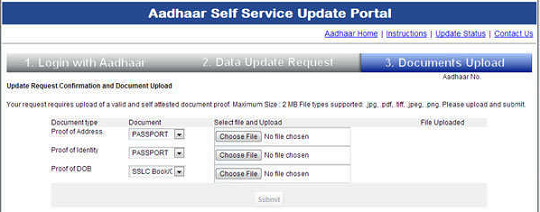
- You will see a Update Request Complete page stating that Your update request has been successfully submitted on date. Your Update Request Number(URN) is 0000/00111/0XXXX. You will also receive a confirmation message on your mobile number along with your Update Request Number.You can download the acknowledgement slip (in pdf format) by clicking on the Download File button or can take a printout of it for future reference by clicking on Print.
- You can then logout by clicking on the Logout link at the top right corner of the page.
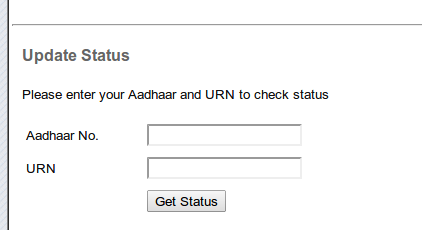
- You can track Change or Update request status using your Aadhaar number and URN by going to https://ssup.uidai.gov.in/web/guest/check-status and entering Aadhaar & URN number as shown in image below.
Why Aadhar update request is rejected?
| Rejection in case of | Cases |
|---|---|
| Junk Data in the request | When the data in the request field is invalid and junk data such as “Aaajjjjj” “kmlkjf” AA etc. If the request field has no meaningful data |
| Invalid Documents | When the request is not supported with a valid POI/PoA as prescribed in the policy. |
| Document Not Legible | When document and photo is not clear (readable) |
| Document Not Self Attested | When document is not self attested by resident |
| Data Mismatch in Document and Update Request | When there is mismatch in data entered in the request and in the document uploaded/sent by Resident |
| Transliteration Error in the Request Field | When local language transliteration is incorrect and local language does not match with the data in the document uploaded.
Transliteration is the process of converting a word to its phonetic (similar sound) equivalent in another language. In Aadhaar enrollment all your demographic details are transliterated to the local language of the state where the enrollment happened. Transliteration Error in the Request Field, means that the information you provided at the time of submission in English did not translate to your local language correctly. Try updating again and make sure whatever details you are writing on the left side in English is getting translated correctly in your local language.Go to the local language field on right hand side and retype in English. You may tweak the spelling a little to get the right phonetics and thus correct the local language spelling. Press tab key. If more than one option in local language appears on the local language field for the word, select the one that is correct. The instructions for transliteration are provided on the page where data entry is done if it still does not work send the update Request through Post. |
| Photo Mismatch on POI and Aadhaar | When there is a mismatch between photo of the resident on POI document and in the Aadhaar database |
| Mismatch of Age on document with photo on Aadhaar | When there is apparent age mismatch between the age cited in the request field and photo in Aadhaar database |
| Verification Call Failed | When resident is not able to answer all the questions satisfactorily |
| Resident Not Reachable | When resident is not reachable on the contact number after three attempts on three separate days |
| Update declined | On telephonic verification if resident has declined an update request |
Related Articles:
- JAM Trinity: Jan Dhan Yojana, Aadhaar and Mobile number
- Aadhaar : What is Aadhaar, How to enrol,Check Aadhaar status,Download e Aadhaar
- Pradhan Mantri Suraksha Bima Yojana,Pradhan Mantri Jeevan Jyoti Bima Yojana and Atal Pension Yojna
- Digital India
- Know Your Customer or KYC
This article outlined how to correct/update Aadhaar. Did you have to make any changes? How much time did it take?

60 responses to “How to Update or Correct Details in Aadhaar”
आधार कार्ड में मोबाइल नंबर, एड्रेस आप घर बैठे चैंज कर सकते है – चैंज करने के लिए यहां क्लिक कीजिए
I received Junk Data in Request when using the Address Validation Letter method. The address is of my mother’s. I don’t understand how this is possible
Steps to check the status of aadhar online click on below link..
http://www.iaadhar.in/how-to-check-aadhaar-card-status-online
To know your bank account linked with aadhar or not.please Follow these steps
I want update my date of birth but i do not have birth certificate i have my educational document like 10th , 12th mark sheets. are these document accepted for DOB updation ?
आधार कार्ड में मोबाइल नंबर, एड्रेस आप घर बैठे चैंज कर सकते है – चैंज करने के लिए यहां क्लिक कीजिए
I currently live in the US. I got the Aadhar card done four years ago when I was in India. Recently when filing the income tax return, I realized that the year of birth was wrongly registered. Since I am outside of India, I do not have the registered mobile with me. How can I get it updated, from the USA? I believe it is required to keep your back accounts accessible too.
You can change the same by sending documents through a post. You can find the aadhaar correction form and address to send documents from UIDAI website.
आधार कार्ड में मोबाइल नंबर, एड्रेस आप घर बैठे चैंज कर सकते है – चैंज करने के लिए यहां क्लिक कीजिए
How to change my photo in adhar
You can make changes correction in your Name, Address, Phone, Gender, Date of Birth, Mobile Number online.
Unfortunately, you can’t change your photo on Aadhaar online but the good news is that you can do it offline.
There are 2 ways to make changes in Aadhaar card photo 1st method is you can apply via a letter with a correct photo (duly attest-prefereably with copy of photo id enclosed) along with a request and Xerox copy issued aadhaar id to UIDAI Regional office.
UIDAI Regional Office Address
Regional Office
Khanija Bhavan,
No. 49, 3rd Floor,
South Wing Race Course Road,
Bangalore – 560 001
In 2nd step you have to visit the nearest Aadhaar card center from where you got the Aadhaar enrollment receipt if that Aadhar center is closed not to worry you can find your nearest Aadhar center details from here
At aadhaar center you have to fill a correction or update form may be Aadhaar official will ask your bio matric details once again. You have to pay some fee for this service because government is not paying any charges for Aadhaar updation, but your first aadhaar enrollment is absolutely free. Your new photo will be update within 15-30 days after applying of photo change on aadhar and you can check the status of your Aadhar online here
Hi, I need to update my name and everytime i get a transileration error. The problem is when it translates into marathi the spelling is wrong. My english spelling is correct. And system does not allow me to copy from a virtual marathi keyboard too. Please help.
My name is Ken Mathew. For the right marathi spelling in the system my english name has to spelled as ken mathu. Can you please help
See if this infomation or video helps Transliteration error solve online aadhar update
Hi
When we update address in aadhar through online self service portal, we need to attach scanned copy of PoA. The question is whether this scanned copy should have our signature (self attested) or not.
If signature is required, is it fine to take a photocopy of the PoA, put signature on the photocopy, scan it, and upload it.
Thanks
Rishin
Clearly write your AADHAAR number on all document copies. Your name must be clearly written below the signatures/thumbprint when self attesting the documents.
Yes to self attest the document
take a photocopy of the PoA, put signature on the photocopy, scan it, and upload it.
Thanks for providing information.These is very useful for everyone.
Sir while in tamilnadu I made the aadhar card.as I am now transferred to jharkhand I want to update the address…but the message from aadhar centre is ur urn rejected due to transiliration error.. Sir whether I will transalate in Tamil or Hindi… Please guide
For changing name in aadhar card, i have provided marriage certification which is valid as per POI list present in below link
https://ssup.uidai.gov.in/web/guest/ssup-instructions
Still my urn got rejected by message : Invalid documents.
My POI all other documents(PAN, Voter ID), surname is first and name is second. Only in my marriage certificate name correct.
If you have any idea please help me.
what is the cost to rectify my address in my aadhar card by local enrolment center in west bengal thakupukur area ?
i have updated my aadhar card in aadhar centre and they had asked for 50 rupees and i have given it but now also to get my aadhar card updated one they are asking more rupees 50
hey
i have applied for update of my aadhar online. its showing as the process is completed. i dont no what is next step. its been 10 days that its been but i havent got any post or new aadhar to the given address. i dont know the next procedure.
I have attached the photocopy of my recent address ration card with my thumb impression and a signature. Still, the URN is getting rejected and they says that document is not self attested.
What else need to be provided
hello
thanks for enhance our knowledge about the aadhar card and get detail information about know your pan details here.
Hello
I tried to change address and gave property tax receipt as proof of address. However my request keeps getting rejected every time due to invalid documents.
Can you help me out? Thanks
Hi Hasan,
Please get the list of address proof to change the address in Aadhar card.
Passport,Bank statements and bank passbooks,Post Office account statement or passbook,Ration card,Voter ID,Driving License,Government Photo ID cards service photo identity card issued by PSU,Electricity bill as long as it’s not more than 3,months old Water bill issued within the last 3 months,Telephone landline bill issued in the last 3 month,Credit card statement from the last 3 months,
Insurance policy, signed letter with photo from bank on letterhead,Signed Letter with a photo issued by a registered Company on the company’s letterhead,
Signed Letter with a photo issued by a recognized educational institute on their letterhead,NREGS job card,Arms license,Pensioner card,Freedom fighter card,Kissan passbook,CGHS / ECHS card,Certificate of address with a photo issued by an MP, MLA, gazetted officer or a tehsildar on their letterhead,
Certificate of address issued by the head of the Village Panchayat or its equivalent authority for rural areas,Income Tax assessment order,vehicle registration certificate,Registered sale / lease / rent agreement for the place of residence,Address card with a photo issued by the Department of Posts,Caste and Domicile Certificate having Photo issued by State Govt,Disability ID Card/handicapped medical certificate issued by the respective State/UT Governments/Administrations,Gas connection bill (not older than 3 months),
Passport of your spouse,Passport of Parents if the applicant is a Minor
For More details visit at the article why aadhar card rejected
Online Update for Change of Address is enough and it works . My first hand experience says that it works with 100% success provided that one has given a Proof of Address enlisted in drop down .
If first time request fails , check the reason and try it again.
Scanned copy of Electric Bill , Registered Rent agreement ( not Notorized but Registered ) , Bank passbook , TAX assessment Order are few of valid POA. Do not go offline mode and give money to Adhaar centers . They may charge Rs 50 instead of Rs 15 as declared by gov. All the best .
Is online address change in aadhaar enough for passport verification?
Online Update for Change of Address is enough and it works . My first hand experience says that it works with 100% success provided that one has given a Proof of Address enlisted in drop down .
If first time request fails , check the reason and try it again.
Scanned copy of Electric Bill , Registered Rent agreement ( not Notorized but Registered ) , Bank passbook , TAX assessment Order are few of valid POA. Do not go offline mode and give money to Adhaar centers . They may charge Rs 50 instead of Rs 15 as declared by gov. All the best .
I am trying to update the address in my Aadhar card. I did everything step by step. I submitted I got the URN. After 24 hours, I got a message in my mobile that my request rejected due to “Transliteration Error in the Request Field”. Please help me
Transliteration Error in the Request Field, means that the information you provided at the time of submission in English did not translate to your local language correctly. Try updating again and make sure whatever details you are writing on the left side in English is getting translated correctly in your local language. if it still does not work send the update Request through Post.
How to rectify transliteration error
Transliteration Error in the Request Field, means that the information you provided at the time of submission in English did not translate to your local language correctly. Try updating again and make sure whatever details you are writing on the left side in English is getting translated correctly in your local language. if it still does not work send the update Request through Post.
If you are trying to update in KArnataka , chose KARVY BPO while updating address. They have correct software to remove Transliteration Error. I faced same error and that time i chose Aegis BPO. next time i chose KARVY BPO and it went fine .
I am trying to update the My Name of my Aadhar card. I did everything step by step. I submitted I got the URN. After 24 hours of me submitting, I got a message in my mobile that my request rejected due to “Transliteration Error in the Request Field”. Please help me
I am trying to update the My Name of my Aadhar card. I did everything step by step. I submitted I got the URN. After 24 hours of me submitting, I got a message in my mobile that my request rejected due to “Transliteration Error in the Request Field”. Please help me
Hi,
I also need to change name after marriage but it got rejected 2 times.
What documents need to be provided for name change??
What documents did you submit?
sir i have updated my aadhar mobile number successfully it’s too given me a urn number but after when i have tried to my status it’s noticing invalid urn number but i’m entering correctly everything
I am trying to update the address of my Aadhar card. When I made the Aadhar, I was in Gujarat. Now I have shifted to Mumbai and trying to change address. I did everything step by step. I submitted I got the URN. After 24 hours of me submitting, I got a message in my mobile that my request rejected due to “Transliteration Error in the Request Field”. I was careful while inputting and though I do not know Gujarati but I think the translation was correct.Please help me
I had to update my adhaar card for address and phone number and visited the adhaar centre and they took all details , later they took 200 Rs saying its card charges and they told me to collect it at their centre after i get a message from both adhaar and their centre
my question is is adhaar update is chargeable and they told now all adhaar comes like a card like our credit cards not the long once , i need to know how true is that .
i am calling customer care they don’t respond properly and sometimes cut calls if they can’t answer
Hi Thanuja,
The official charges are Rs.15 for updating the details in the aadhar card. Did they give you a receipt for the same? If not, after your details are updated, file a complaint against them.
I want to change date of birth of aadhar card but i don’t have birth certificate my birth is before 1989.
I have 8th pass certificate.
Online update of date of birth document required is
Sslc/certificate
Passport
Birth certificate
Is it possible to change birth date by providing date of birth correction affidavit
i upadate my aadhar card but how upadate download
Can’t understand the question. Can you explain what you want?
Go to https://uidai.gov.in/ and download Adhaar
Hi
I have sent my update request by post for address update and mobile no addition to aadhaar.
It is more than a month and there is no response.
How long does it take?
No idea sir. Its snail mail and then Aadhaar.
Online is faster and you can track also.
Hi
I have sent my update request by post for address update and mobile no addition to aadhaar.
It is more than a month and there is no response.
How long does it take?
No idea sir. Its snail mail and then Aadhaar.
Online is faster and you can track also.
Aadhaar data can also be updated by visiting nearest Aadhaar Update center or You can update it online also or through Post , Other updates like photo change, local language change can also be done visit aadharcard.info for detailed info
Aadhaar data can also be updated by visiting nearest Aadhaar Update center or You can update it online also or through Post , Other updates like photo change, local language change can also be done visit aadharcard.info for detailed info
Hi, I had a weird experience when I tried updating my address. After receiving Aadhar moved to a new rental and tried to update the address using the online option. Believe, I followed all the rules for submission of POA (in my case – only the rental agreement) and tried twice. Each time they were rejected as
Reject Reasons : Invalid Documents
Already tried twice, not sure what to do next. Any guidance is highly appreciated. Thanks.
Rent agreement is not a valid proof of address for Address update that is why your update request is rejected please give any of the 33 proof of address listed in UIDAI website for Address update . For detailed list of Proof of address visit http://www.aadharcard.info/aadhaar-card-valid-documents-list/
Thanks for your reply. The link does state the following bullet
Registered Sale / Lease / Rent Agreement
Which means “rent agreement” is a valid document for POA.
Only Registered Rent agreement . Nototrization of Rent Agreement is not enough . One has to go to local regsitrar office with the ID of Landlord and self ID as well and registered it .
Hi, I had a weird experience when I tried updating my address. After receiving Aadhar moved to a new rental and tried to update the address using the online option. Believe, I followed all the rules for submission of POA (in my case – only the rental agreement) and tried twice. Each time they were rejected as
Reject Reasons : Invalid Documents
Already tried twice, not sure what to do next. Any guidance is highly appreciated. Thanks.
Rent agreement is not a valid proof of address for Address update that is why your update request is rejected please give any of the 33 proof of address listed in UIDAI website for Address update . For detailed list of Proof of address visit http://www.aadharcard.info/aadhaar-card-valid-documents-list/
Thanks for your reply. The link does state the following bullet
Registered Sale / Lease / Rent Agreement
Which means “rent agreement” is a valid document for POA.
I feel like the Rent Agreement should be a registered document in your local Registration office. then this document could become a valid document.
correct @ganesan